Renaissance portrait AI: turn your photo into an old master painting
By Sophia Miller, Fashion and aesthetics editor · Updated · 4 min read
the short version
A Renaissance portrait turns your photo into something that could hang in a museum: rich oil paint texture, dramatic side light, a dark background, velvet, lace and pearls and a calm, dignified pose. Upload a clear photo, name the era and the details, ask to keep your face, and then animate it with a slow blink or a candle flicker for a portrait that seems to come alive.
AI Photo to Video
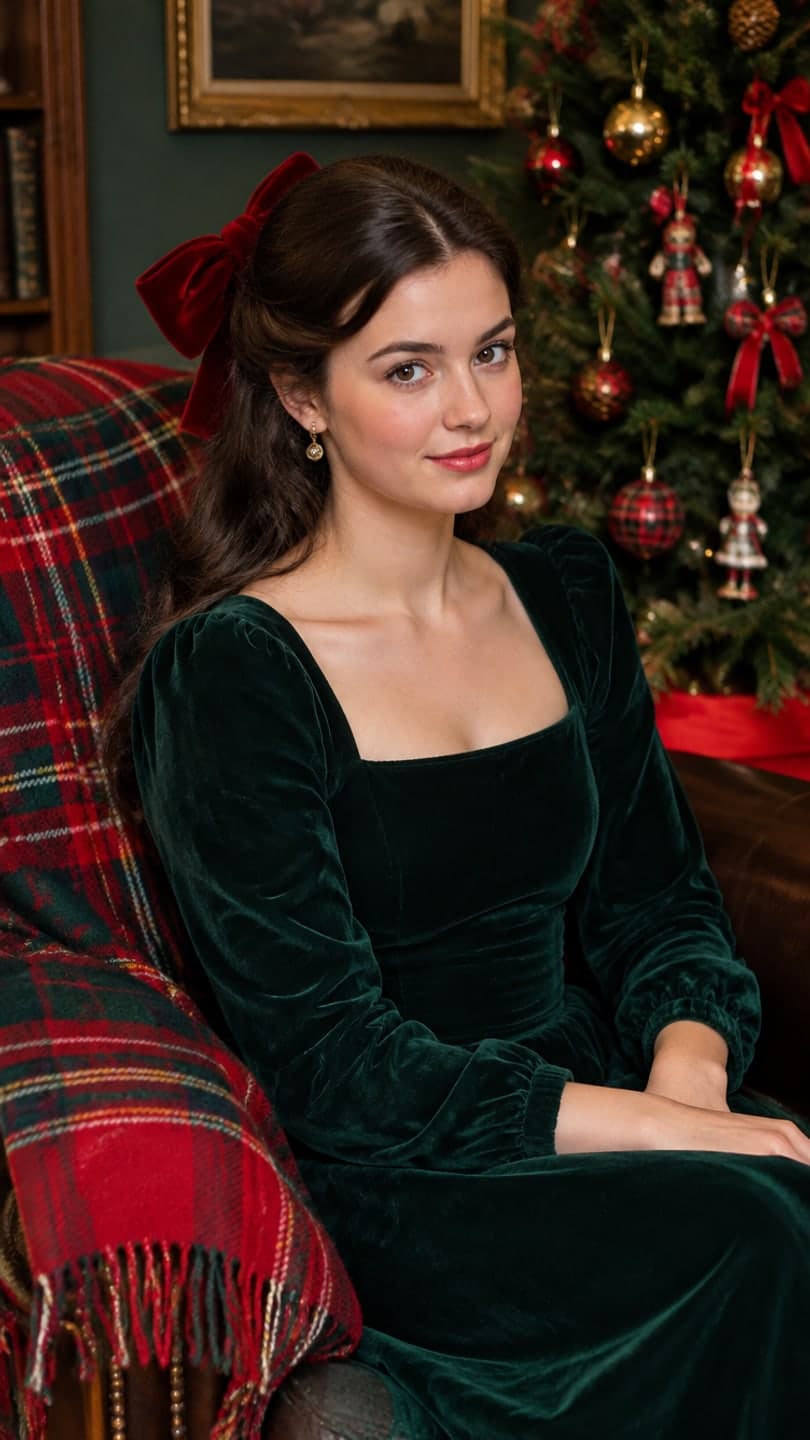 Velvet bow portrait
1 Pick a look · optional
We put you into this example — everything else stays as it is — then it moves like the example, at no extra cost.
Failed renders refund credits
Why is the Renaissance portrait trend popular?
Old master portraits have a grandeur no selfie can match: deep shadows, glowing skin, sumptuous fabrics and the feeling of history. Seeing yourself, your partner or your pet painted that way is funny and flattering at the same time. It's a favorite for profile pictures, gifts, couple anniversaries and the endlessly popular noble pet portrait, where a dog or cat poses in a ruff and royal robes.
Because the style is centuries old, it's free to use. You're borrowing an era, not copying a specific painting.
Which painting styles can I try?
- Renaissance: soft light, calm poses, landscapes behind, rich reds and blues.
- Baroque: dramatic chiaroscuro, a single candle or window, deep black backgrounds.
- Dutch Golden Age: quiet interiors, pearls, white collars, soft daylight.
- Royal court portrait: crowns, robes, ermine and a throne.
- Pre-Raphaelite: flowing hair, flowers, jewel colors.
- Victorian: dark dresses, lace, a more sober mood.
Try this look on your own photo.
Make it with my photoHow do I make a Renaissance portrait?
Step 1
Upload a clear photo
Front-facing or three-quarter, good light, face visible.
Step 2
Name the era and details
In AI Image: "Baroque oil painting portrait, dramatic candlelight from the left, dark background, deep red velvet gown, pearl necklace, lace collar, visible brushstrokes, same face".
Step 3
Ask for paint texture
Words like "oil on canvas", "visible brushstrokes" and "craquelure" make it look painted.
Step 4
Make a few versions
Each image uses 10 credits.
How do I make a pet into a noble portrait?
Pet portraits are the trend's biggest hit. Use a clear photo of your pet looking at the camera and describe them by breed and markings, plus the costume: "oil painting of a fluffy grey cat as a seventeenth-century duchess, lace ruff, velvet robe, pearl necklace, dark background, same markings". Royal titles in the caption, like "Sir Biscuit, Duke of the Sofa", make it even better. Our guide to animating pet photos shows how to make the portrait move.
How do I make the painting move?
A painting that slowly blinks, smiles or turns its eyes toward the viewer is wonderfully eerie and very shareable. Take your portrait into AI Video and describe one subtle motion: "the painted portrait slowly blinks and a faint smile appears, the candle flickers, oil painting style stays the same". Keep it very subtle and say the style must stay painted. Animating a painted portrait for five seconds on Dromana costs 70 credits.
- A slow blink and a faint smile.
- Eyes turning to follow the viewer.
- Candlelight flickering across the face.
- A curtain moving slightly in the background.
- Hair or a feather in the hat stirring.
Which details make it look authentic?
- One strong light source from the side.
- A dark, plain or draped background.
- Period fabrics: velvet, brocade, lace, fur.
- Jewelry: pearls, gold chains, a brooch.
- Props: a book, a flower, a small dog, a letter.
- Oil texture: visible brushstrokes and fine cracks.
For a modern glamour version of dramatic portraits, try the velvet bow portrait or scarlet couture looks.
Can I make couple or family portraits?
Yes. Use one photo with everyone and describe a formal group portrait: "Dutch Golden Age family portrait, everyone in black with white lace collars, soft window light". They make memorable anniversary and holiday gifts. Ask everyone first, and check each face. For more family scenes, see AI family photo ideas.
How much does it cost?
Each portrait image uses 10 credits, so a few versions in different styles cost very little. New accounts get 140 free credits with no card. If you plan to sell prints, make them on a paid plan or with a pack you bought; see can you sell AI images on Etsy.
Questions people ask
Can AI turn my photo into a Renaissance painting?
Yes. Upload a clear photo, name the era, the lighting and the clothes, and add "same face".
Which painting styles can I try?
Renaissance, Baroque, Dutch Golden Age, royal court, Pre-Raphaelite and Victorian.
How do I make it look like real oil paint?
Ask for oil on canvas, visible brushstrokes and fine cracks, with one strong side light.
Can I make my pet a noble portrait?
Yes. Describe your pet by breed and markings and add a ruff, robes or a crown.
Can the portrait move?
Yes. A slow blink or a faint smile in AI Video, keeping the painted style.
How much does it cost?
Each portrait image uses 10 credits; new accounts get 140 free credits.
Effects from this guide
 AI fashion portraitSkip the photographer: get a magazine-style fashion portrait from one selfie. Quiet-luxury coats, street editorial, studio light. Same face, new shoot. Free to try.
 Make a photo moveUpload one photo, get a 5-second video in a minute or two: a smile, a head turn, wind in the trees, waves rolling in. Works on portraits and landscapes, free to try.
Keep reading
 How to animate a pet photo: make your dog or cat move with AI4 min read
 AI family photo ideas: holiday portraits, reunions and moving keepsakes4 min read
 Turn yourself into anime with AI: styles, prompts and moving clips4 min read
 Turn yourself into a vintage Christmas cartoon, then make it move4 min read
 The AI figurine trend: make a mini you climb out of your phone5 min read
Ready to make yours?
Add one photo and get the look from this guide.