Motion portraits: how photographers can add AI video to their packages
By Noah Reynolds, Media and brand content · Updated · 4 min read
the short version
Motion portraits are a few of a client's favorite photos from a session, gently animated: hair moving, a slow smile, veils drifting, a soft camera push. Photographers can offer them as an add-on to portrait, wedding and family packages, delivered as short clips for social media. Keep the motion subtle, check every frame, get clients' consent for AI and price them like any other product.
AI Photo to Video
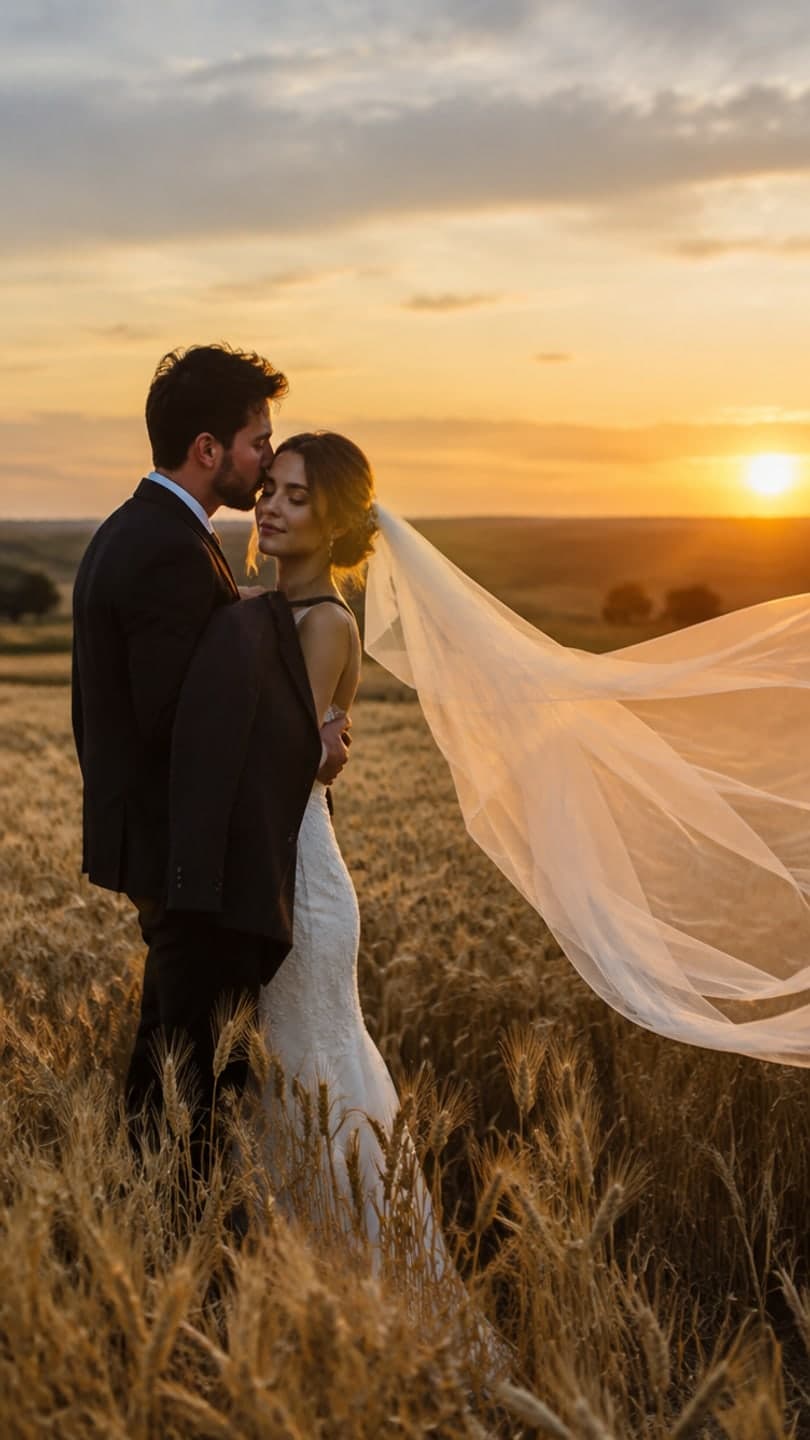 Sunset wedding
1 Pick a look · optional
We put you into this example — everything else stays as it is — then it moves like the example, at no extra cost.
Failed renders refund credits
What is a motion portrait?
A motion portrait is a still photograph with life in it: a bride's veil lifting in a breeze, a couple laughing as the camera drifts closer, a newborn's slow yawn, a family's hair moving at sunset. It keeps your composition and editing and adds a few seconds of subtle motion. Clients love them for Instagram and TikTok, where video gets far more reach than stills, and they make your work more shareable.
AI makes them quick to produce from photos you've already delivered, which turns them into a simple upsell.
Which photos make the best motion portraits?
- Portraits with flowing elements: hair, veils, dresses, scarves.
- Outdoor sessions with grass, water, leaves or sky.
- Candid laughs, where a small movement continues the moment.
- Golden-hour shots, where light can flicker through.
- Wedding moments: the veil, the confetti exit, the first look.
Try this look on your own photo.
Make it with my photoHow do I create a motion portrait?
Step 1
Use the final edited photo
Full resolution, your final color grade.
Step 2
Animate gently
On the make a photo move page: "the veil lifts softly in the breeze, she smiles, very subtle motion, slow push in".
Step 3
Check every frame
Faces, hands, rings and details must stay as they were photographed.
Step 4
Deliver as a short clip
Five seconds, vertical or in the original orientation.
A five-second motion portrait on Dromana costs 70 credits at 768p.
How do I keep motion portraits high quality?
Your reputation depends on quality, so be strict. Keep motion very subtle: one or two things moving, not the whole scene. Check faces closely, especially in group photos and with children, and regenerate anything where a face or hand changes. Match the clip's look to your editing style. If a photo doesn't animate cleanly after a couple of tries, choose a different one. Clients would rather have three perfect clips than ten mediocre ones.
Do I need clients' consent for AI?
Yes, ask. Some clients love the idea; others don't want their images processed by AI. Add a line to your contract or booking form about AI-enhanced products, explain what you'll do and get a clear yes. Use only photos from their session, and let them choose which ones. Keep uploads private and delete them when you're done; Dromana deletes uploads and results after 30 days and doesn't use them to train a public model.
How should I price motion portraits?
- As an add-on: a set of three or five clips per session.
- Included in premium packages to make them more attractive.
- As a wedding extra: a highlight set for social media.
- As a holiday product: a moving family card from the session.
Price on value, not production time. A single clip costs you about 70 credits; what the client pays for is your selection, your edit and the result.
Can I use motion portraits commercially?
Yes, on the right plan. Results made on a paid plan or with a pack you bought can be used commercially, including delivering them to paying clients and using them in your own marketing; until you buy something, results are for personal use. Any pack, from $4.99 for 6 videos, removes the small badge, which you'll need for client work. For marketing your business, see the best AI video tools for small business.
How do I market the add-on?
Show it. Post before-and-after pairs of a still and its motion portrait (with clients' permission), add a sample to your pricing guide and mention it during booking. Wedding and family clients respond especially well. For wedding-specific ideas, see the best AI wedding video apps, and for animation basics, how to animate a photo.
Questions people ask
What is a motion portrait?
A photograph with a few seconds of subtle motion added, like hair moving or a slow smile.
Can photographers sell AI motion portraits?
Yes, as an add-on or package extra, made on a paid plan or with a pack you bought, with client consent.
Which photos animate best?
Portraits with flowing hair, veils, fabric, grass, water or golden light.
How do I keep quality high?
Keep motion subtle, check every face and hand and only deliver clean clips.
Do I need client consent?
Yes. Add AI-enhanced products to your contract and get a clear yes.
How much does a motion portrait cost to make?
About 70 credits for 5 seconds on Dromana at 768p.
Effects from this guide

Keep reading
 Best AI wedding video apps: save-the-dates, invites, recaps and anniversaries4 min read
 How to make a photo move: 4 ways, ranked4 min read
 Best AI video tools for small business marketing in 20264 min read
 A photo with Santa without the mall line: a Santa selfie and video from one photo5 min read
 The holiday defrost trend: thaw out of the ice when the season starts4 min read
Ready to make yours?
Add one photo and get the look from this guide.