AI photo to video: the questions people actually ask, answered
By Peter Huang, AI video technology · Updated · 6 min read
the short version
AI photo to video turns one still photo into a short moving clip: the model keeps the person or product from your photo and adds motion, camera movement and sometimes a whole new scene. You upload a clear photo, describe what should happen or pick a ready-made look, and get a 5 to 10 second vertical or wide video in a few minutes, starting free.
AI Photo to Video
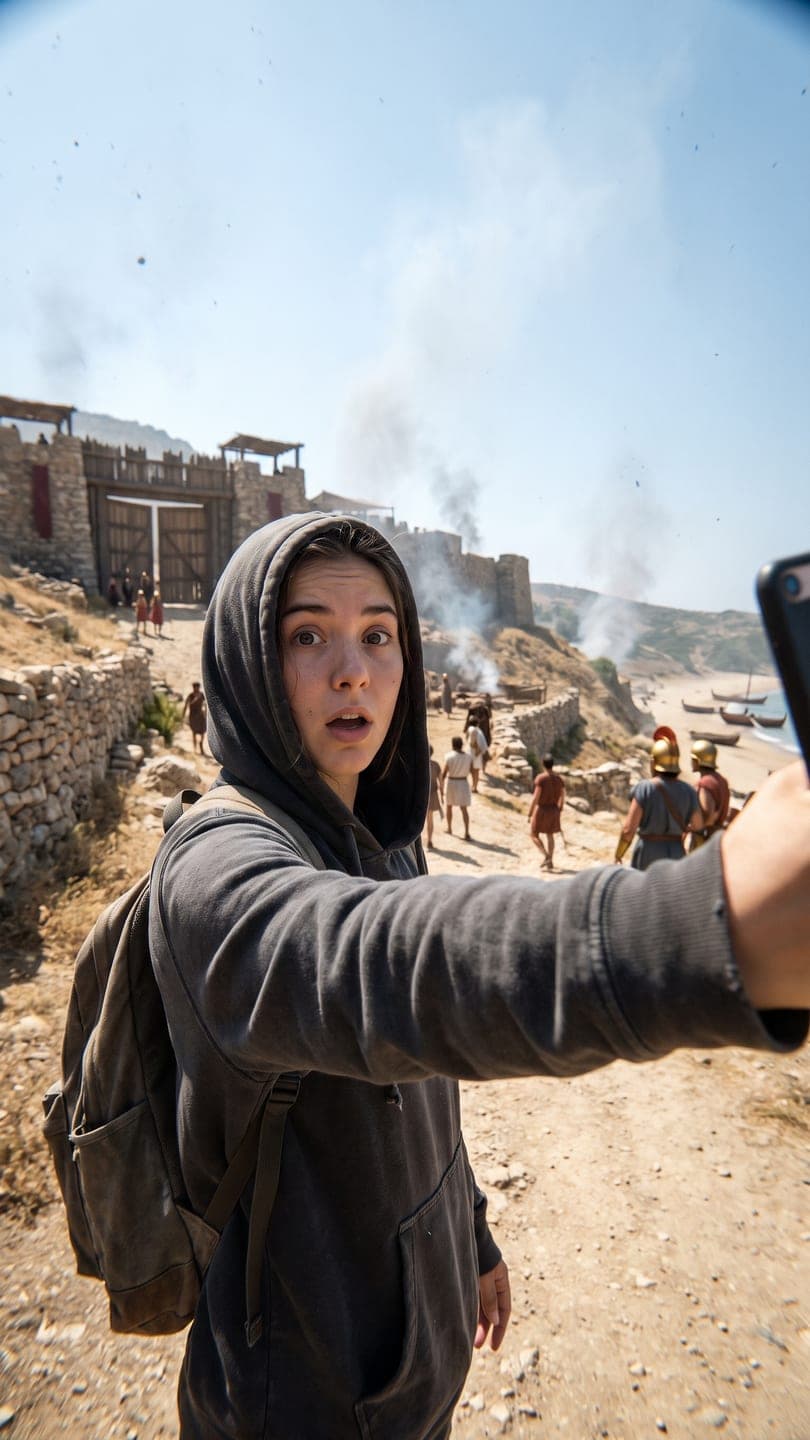 Time-travel vlog
1 Pick a look · optional
We put you into this example — everything else stays as it is — then it moves like the example, at no extra cost.
Failed renders refund credits
How does AI photo to video actually work?
A video model looks at your photo as the first frame and predicts what the next few seconds would look like, guided by your text. It has learned from a huge amount of footage how hair moves in wind, how people walk and how a camera pushes in, so it can invent believable motion that wasn't in the photo. It doesn't have a 3D scan of you; it's continuing the picture in a way that looks right.
There are two common ways to use it. You can animate the photo as it is (your selfie starts smiling and the camera drifts), or you can first rebuild the photo into a new scene and then animate that, which is how trend looks work: the example shot is recreated with you in it, then it moves like the example. On Dromana, the first is AI Video and the second is any look on the looks page.
What kind of photo should I use?
The photo decides most of the quality. The model can only keep what it can see clearly, so a sharp, well-lit photo of the face (or the product label) matters more than anything else.
- Face visible and in focus, looking at the camera or slightly turned.
- Soft, even light. Strong shadows, backlight and night shots lose detail.
- No sunglasses, masks, heavy filters or beauty mode for face looks.
- Framing that matches the result: full body for walks and dances, waist-up for most scenes, close-up for makeup.
- For products: front-facing, label sharp, nothing covering it.
Our best photos for AI video and selfie tips for AI photos guides go deeper, with examples of what works and what doesn't.
Try this look on your own photo.
Make it with my photoHow much does it cost to turn a photo into a video?
On Dromana you pay with credits. A 5-second clip on Dromana uses 70 credits, or 70 on Dromana for bigger moves; a look, which first rebuilds the scene with you in it, adds 20. A still image uses 10. New accounts get 70 free credits with no card, enough for a first video, and 35 more every day they visit.
After that you can buy a credit pack without subscribing (500 credits for $8) or choose a plan from $10 a month, which also removes the small dromana.app badge on free results and allows commercial use. Full details are on the pricing page. If a video fails or the model turns it down, the credits go back automatically.
How long are the videos, and do they have sound?
Dromana and Dromana make 5, 8 or 10-second clips; looks are 5 seconds. Other engines in AI Video go longer. You can choose vertical 9:16 for TikTok, Reels and Shorts, or wide 16:9 for YouTube and presentations.
Clips come back without sound on purpose. Trends live on the sound, and TikTok and Instagram group videos by the audio you pick inside the app, so you'll get more reach by adding the trending sound there than by baking in your own. For multi-photo videos, see photos to TikTok video.
Will it still look like me?
With a good photo, yes in most cases, but no model is perfect. Faces drift most when the photo is small, dark or at a sharp angle, when the motion is extreme (a fast spin, a big jump), or when the face is partly hidden. Close-up, front-facing photos and gentle motion keep the strongest likeness.
Step 1
Start gentle
Ask for a small movement first: a smile, a glance, a slow push-in. If that looks right, try bigger motion.
Step 2
Change one thing at a time
If the face drifts, swap the photo before rewriting the prompt.
Step 3
Use a look
Looks are tuned to keep the person from your photo while changing everything else in the shot.
Is it safe to upload my photos?
On Dromana, your photos and results are private by default and are deleted after 30 days, or sooner if you delete them yourself. They are never shown publicly unless you create a share link. They are not posted to the looks gallery; every example there is our own AI work.
Some rules exist to protect other people: only upload photos you have the right to use, don't upload anyone without their agreement, and don't make sexual content or content that targets real people. The safety guidelines list the details, and our AI photo app privacy guide explains what to check in any app.
Can I use AI videos for my business or brand?
Yes, if you made them on a paid plan or with credits from a pack you bought: you can use them in shop listings, product pages, posts for your business and ads. Results made only with free credits are for personal use. In both cases you need the rights to what you upload, and anyone shown must have agreed.
For sellers, product looks put your product into ad-style scenes while keeping its shape, label and color. Start with product photo to video or the TikTok Shop holiday video guide.
What can't AI photo to video do well yet?
It's worth knowing the limits so you don't waste credits. Current models still struggle with:
- Hands doing precise things, like typing or playing an instrument up close.
- Readable text that moves, such as a sign the camera passes; small text can warp.
- Very long continuous action; a 5 to 10 second idea is the sweet spot.
- Exact choreography to a specific song; you get dance energy, not the exact steps.
- Several people with fast overlapping motion in one shot.
Plan around these: keep one idea per clip, put text on top in TikTok or Instagram rather than in the scene, and use a sequence of short clips for longer stories. Our image-to-video prompts guide has wording that plays to the model's strengths.
Questions people ask
Can I turn a photo into a video for free?
Yes. New Dromana accounts get 70 free credits with no card, enough for a first video, and 35 more every day they visit.
How long does it take to make an AI video from a photo?
Usually one to three minutes, depending on the length and engine.
What is the best photo for AI video?
A sharp, well-lit photo with the face clearly visible and framing that matches the result: full body for walks, waist-up for scenes, close-up for makeup.
Do AI photo-to-video clips have sound?
No. Add a trending sound inside TikTok or Instagram, which also helps the video reach people following that trend.
Are my photos private?
Yes. Photos and results are private, deleted after 30 days or sooner if you delete them, and never shown publicly unless you share a link.
Can I make a video of someone else?
Only with their permission. Don't upload photos of people who haven't agreed.
Can I use the videos commercially?
Yes, if made on a paid plan or with a credit pack you bought. Results made only with free credits are for personal use.
What's the difference between AI Video and a look?
AI Video animates your photo as it is or follows your prompt. A look first rebuilds a ready-made scene with you in it, then animates it like the example.
Effects from this guide
 Make a photo moveUpload one photo, get a 5-second video in a minute or two: a smile, a head turn, wind in the trees, waves rolling in. Works on portraits and landscapes, free to try.
 Product photo to videoTurn one product photo into a short ad clip: splashes, slow-motion bursts, ice and creator-style reviews, with your label kept as it is. 70 free credits to start.
Keep reading
 How to make a photo move: 4 ways, ranked4 min read
 What photos work best for AI video? The pre-upload checklist4 min read
 Are AI photo apps safe? What happens to your selfies4 min read
 The 10 best AI image-to-video and photo-to-video tools in 2026, by what you want to make6 min read
- Best AI video generators for beginners in 2026: easy tools that just work4 min read
Ready to make yours?
Add one photo and get the look from this guide.