The 3D parallax photo effect: give a flat photo depth with AI
By Claire Ye, Editor-in-chief, AI imaging · Updated · 4 min read
the short version
The 3D parallax effect makes a still photo look like it was filmed: the camera seems to move slowly, so the subject stays put while the background shifts behind it, adding depth. With an image-to-video tool you get it by asking for a slow camera move, like a push in, a pull back or a gentle orbit, and nothing else. Landscapes, portraits and travel photos all work.
AI Photo Restyle
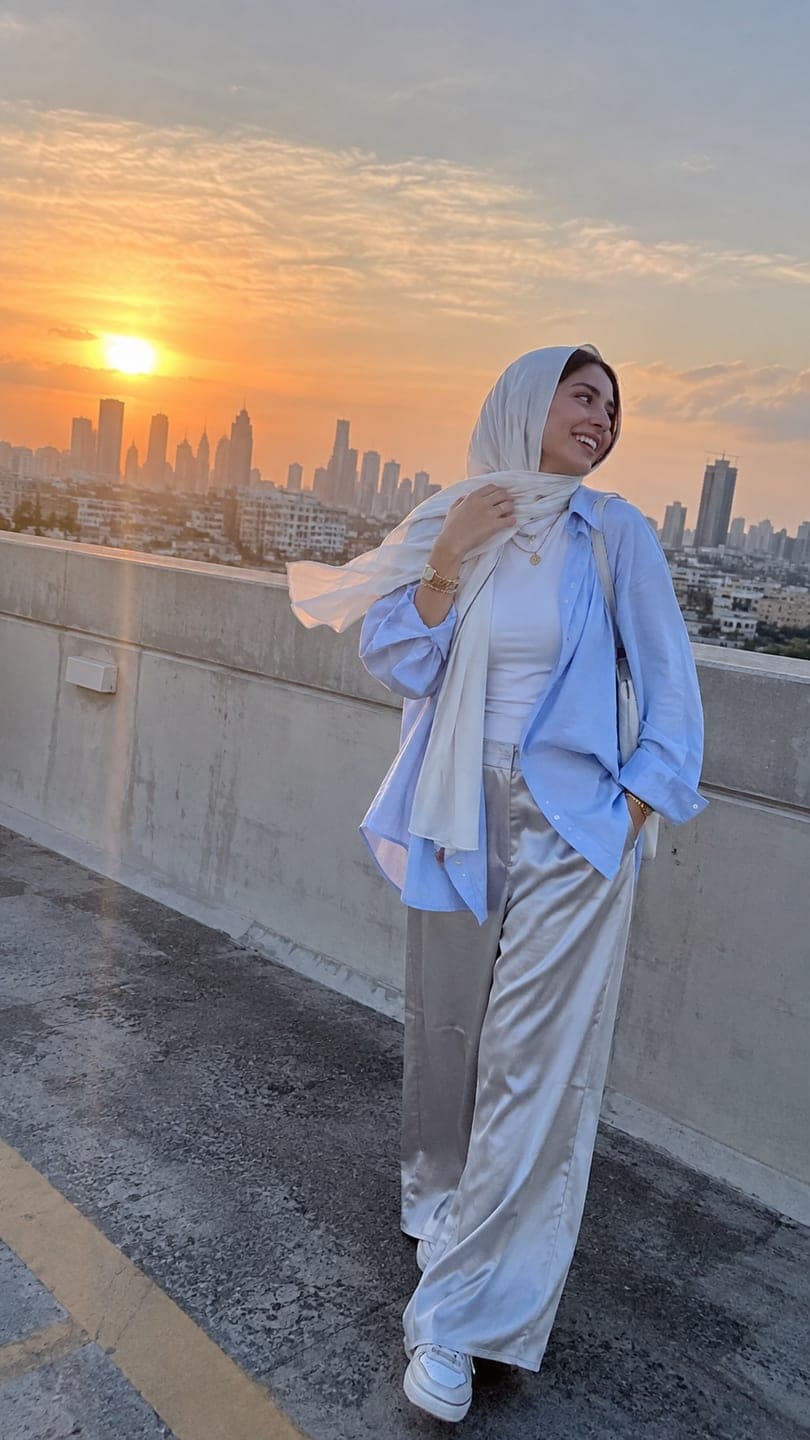 Rooftop sunset
1 Pick a look · optional
We put you into this example and keep everything else the same.
Failed renders refund credits
What is the parallax effect?
Parallax is how near and far things move at different speeds when you move your head: a tree by the road rushes past while the mountains barely move. Video editors fake it on photos by cutting the subject out and sliding the layers at different speeds, which is why it's sometimes called the 2.5D or Ken Burns 3D effect. It turns a flat photo into something that feels deep and cinematic.
AI does it differently. Instead of cutting layers, an image-to-video model generates a short clip as if a camera were moving through the scene, filling in what's revealed behind the subject.
Which photos work best?
- A clear subject in front of a distant background, like a person on a rooftop or a tree on a hill.
- Landscapes with layers: foreground rocks, a lake, mountains behind.
- Street scenes with buildings receding into the distance.
- Portraits with a soft, blurred background.
- Travel photos with a strong focal point.
Try this look on your own photo.
Make it with my photoHow do I create the effect step by step?
Step 1
Upload the photo
On the make a photo move page, which keeps the scene as it is.
Step 2
Ask for camera movement only
"slow push in toward her, the city behind shifts gently, nothing else moves".
Step 3
Choose the direction
Push in, pull back, slide sideways or orbit slightly around the subject.
Step 4
Keep it short
Five seconds of slow movement is ideal.
A five-second parallax clip on Dromana costs 70 credits.
Which camera moves create the most depth?
- Slow push in: moves toward the subject; the background grows slower than the foreground.
- Pull back: reveals more of the scene, great for landscapes.
- Lateral slide: moves sideways; the strongest sense of parallax.
- Gentle orbit: circles slightly around the subject.
- Crane up: rises, revealing what's behind and below.
Combine one move with a tiny natural motion, like hair or water, for a more alive result, but keep the camera the main event.
Can I do it with landscapes and travel photos?
Yes, landscapes are where parallax shines. Mountains, coastlines and cityscapes come alive with a slow push in or a drone-like rise. Add one natural element: clouds drifting, water moving or lights flickering. Our animate a landscape and animate a city photo pages are set up for these scenes, and the best AI travel video apps guide covers trip clips.
Why does my parallax clip look wrong?
- The subject warps: ask for less movement, or a push in rather than an orbit.
- The background changes: add "the scene stays the same".
- Faces drift during orbits: use a push in for portraits.
- Edges smear: start from a sharper, higher-resolution photo.
- It feels too fast: say "very slow" and keep it to five seconds.
How do I use parallax clips?
Parallax clips are perfect openers for travel reels, portfolio videos and slideshows, and they make a photo dump feel like a film. Cut several together, each with a slightly different move, and set them to music. See photo dump videos for the editing side and cinematic photo tips for choosing photos.
How is AI parallax different from the editing-app version?
Editing apps create parallax by cutting the subject out of the photo and moving the layers separately, which often leaves a smeared or stretched edge around the person where the background has to fill in. AI generates the scene as if a camera were really moving, so it invents what's revealed behind the subject instead of stretching it. The result usually looks more natural, with real depth and lighting changes. The trade-off is less precise control: you describe the move instead of setting keyframes.
- Editing apps: layers and masks, precise but often smeared edges.
- AI: generated camera motion, more natural depth.
- Editing apps: exact control over speed and path.
- AI: you describe the move in words.
How much does it cost?
Each 5-second parallax clip on Dromana uses 70 credits; for sharper results, the Dromana setting at 768p uses 70. New accounts get 140 free credits with no card. Failed jobs refund automatically. Start with a layered photo in AI Video.
Questions people ask
What is the 3D parallax photo effect?
A slow camera move on a still photo where the foreground and background shift at different speeds, adding depth.
Can AI make a parallax effect from one photo?
Yes. Ask an image-to-video tool for a slow camera move and nothing else.
Which photos work best for parallax?
Photos with layers: a clear subject in front of a distant background.
Which camera move gives the most depth?
A slow lateral slide, followed by a push in or pull back.
Why does my subject warp?
Too much movement; use a gentle push in instead of an orbit.
How much does a parallax clip cost?
70 credits for 5 seconds on Dromana; new accounts get 140 free credits.
Effects from this guide
 Make a photo moveUpload one photo, get a 5-second video in a minute or two: a smile, a head turn, wind in the trees, waves rolling in. Works on portraits and landscapes, free to try.
 Animate landscape photosBring a landscape photo to life: drifting clouds, rolling waves, mist, wind in the trees or a flickering fire, with the camera still or gliding. Vertical or horizontal.
Keep reading
 How to make your pics look cinematic (even on a phone)4 min read
 Best AI travel video apps: trip recaps, dream destinations and summer posts4 min read
 Photo dump videos: how to turn a carousel into a cinematic clip4 min read
 How to make a cinemagraph from a photo with AI4 min read
 How to make a looping video from a photo4 min read
Ready to make yours?
Add one photo and get the look from this guide.