How to make a looping video from a photo
By Claire Ye, Editor-in-chief, AI imaging · Updated · 4 min read
the short version
To make a looping video from a photo, generate a short clip with a motion that naturally repeats, like flowing water, flickering lights, drifting snow or swaying grass, then make the end meet the start in an editor, either with a boomerang (forward then backward) or a short crossfade. Calm, steady motions loop most smoothly, and a locked camera hides the join.
AI Photo to Video
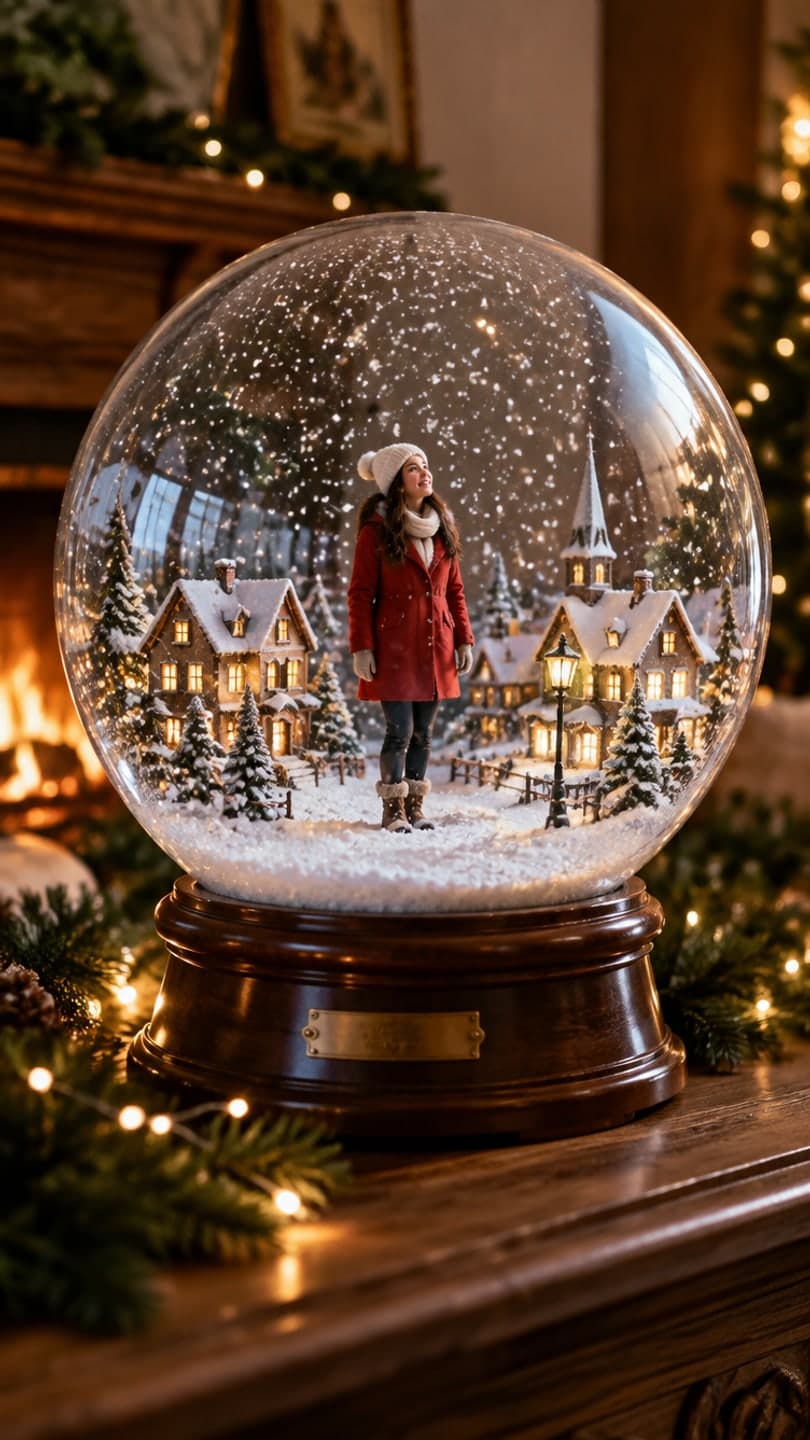 Snow globe
1 Pick a look · optional
We put you into this example — everything else stays as it is — then it moves like the example, at no extra cost.
Failed renders refund credits
Why make a looping video?
Loops are everywhere: Reels and TikToks that replay automatically, phone wallpapers, website banners, digital signage and profile videos. A clip that loops seamlessly feels hypnotic; one with a visible jump at the end feels broken. Short social clips also benefit, because platforms replay them and a smooth loop gets watched several times in a row.
AI makes the motion; a quick edit makes it loop. Together it takes a few minutes.
Which motions loop best?
- Water: waterfalls, rivers, waves, fountains.
- Weather: snowfall, rain, drifting fog, moving clouds.
- Light: candles, fairy lights, neon signs, a fireplace.
- Nature: grass, leaves, flowers in a breeze.
- Small repeated movements: a gentle sway, breathing, a slow blink.
- Cosmic: stars twinkling, a slowly rotating planet or snow globe.
Try this look on your own photo.
Make it with my photoHow do I make a looping video step by step?
Step 1
Choose a photo with a repeating element
Water, lights, snow or grass work best.
Step 2
Generate a calm clip
On the make a photo move page: "the waterfall flows steadily, mist drifts, static camera".
Step 3
Keep the camera still
Camera moves make loops jump; ask for a "static camera".
Step 4
Loop it in an editor
Use a boomerang or a crossfade at the end, then export.
A five-second loopable clip on Dromana costs 70 credits.
Boomerang or crossfade?
A boomerang plays the clip forward, then backward, so the last frame is the first frame and the loop is perfect. It suits gentle, back-and-forth motion like swaying grass, hair or a breathing portrait, but it looks odd with one-directional motion like a waterfall flowing upward. A crossfade blends the last half second into the first, which hides the join on one-directional motion like water, snow and clouds. Most phone editors have both options.
- Boomerang: swaying, breathing, gentle back-and-forth motion.
- Crossfade: water, snow, rain, clouds and flames.
- Either way, keep the camera static.
How do I make looping wallpapers and banners?
For a phone wallpaper, use a vertical photo and very slow, subtle motion so it doesn't distract. For a website banner, use a wide photo, keep motion in one area, like water or sky, and export a short, light file. Cinemagraph-style clips, where only one thing moves, make the calmest loops; see how to make a cinemagraph.
Why does my loop jump?
- The camera moves: regenerate with a static camera.
- The motion has a start and end: choose a repeating motion.
- Lighting changes across the clip: ask for steady light.
- The crossfade is too short: try half a second to a second.
- Too much motion: simpler motion loops more smoothly.
Can I loop a trend look?
Some looks are made for loops. The snow globe swirls continuously, and Christmas lights twinkle in a steady rhythm. Clips with a walk or a reveal, like a catwalk, are better played once with a clear ending; platforms will replay them anyway.
Which photos make the best loops?
Look for a scene where something moves continuously and the camera could plausibly stay still: a waterfall, a fountain, a fireplace, a window with rain, a field of tall grass, a city at night with flickering lights. Photos with a single clear subject in the middle and motion around it work especially well, because the subject anchors the frame while the loop plays. Avoid busy scenes with many people, since each person's motion makes the join harder to hide.
- Continuous motion: water, fire, rain, grass, lights.
- A still anchor in the center of the frame.
- Few or no people.
- Even lighting that won't shift during the clip.
How much does it cost?
Each 5-second clip on Dromana uses 70 credits; new accounts get 140 free credits with no card. Looping is done in your editing app at no extra cost. For depth and camera motion ideas, see the 3D parallax photo effect guide.
Questions people ask
How do I make a looping video from a photo?
Generate a clip with a repeating motion and a static camera, then loop it with a boomerang or crossfade.
Which motions loop best?
Water, snow, rain, clouds, candles, lights and gently swaying nature.
Boomerang or crossfade?
Boomerang for back-and-forth motion; crossfade for one-directional motion like water.
Why does my loop jump?
Usually a moving camera or a motion with a clear start and end.
Can I make a looping wallpaper?
Yes. Use a vertical photo with very slow, subtle motion.
How much does a loopable clip cost?
A loopable five-second clip on Dromana is 70 credits; the first 70 credits are free.
Effects from this guide
 Make a photo moveUpload one photo, get a 5-second video in a minute or two: a smile, a head turn, wind in the trees, waves rolling in. Works on portraits and landscapes, free to try.
 Animate part of a photoMake just one part of a photo move: a flickering fire, flowing water, drifting mist or clouds, with the camera and everything else held still. No masking by hand.
 Animate landscape photosBring a landscape photo to life: drifting clouds, rolling waves, mist, wind in the trees or a flickering fire, with the camera still or gliding. Vertical or horizontal.
Keep reading
 How to make a cinemagraph from a photo with AI4 min read
 The 3D parallax photo effect: give a flat photo depth with AI4 min read
 How to make a photo move: 4 ways, ranked4 min read
 Viral AI video effects explained: bullet time, rides, snow globes and more6 min read
 AI photo to video: the questions people actually ask, answered6 min read
Ready to make yours?
Add one photo and get the look from this guide.