Viral AI video effects explained: bullet time, rides, snow globes and more
By Claire Ye, Editor-in-chief, AI imaging · Updated · 6 min read
the short version
Viral AI video effects are one-tap templates that turn a single photo into a short, impossible clip: you frozen mid-air while the camera circles (bullet time), riding an animal through a landscape, walking into a giant book, swapping outfits on a fan-blade wipe, or sitting inside a snow globe. You pick the effect, upload a clear photo, and get a vertical clip to post.
AI Photo to Video
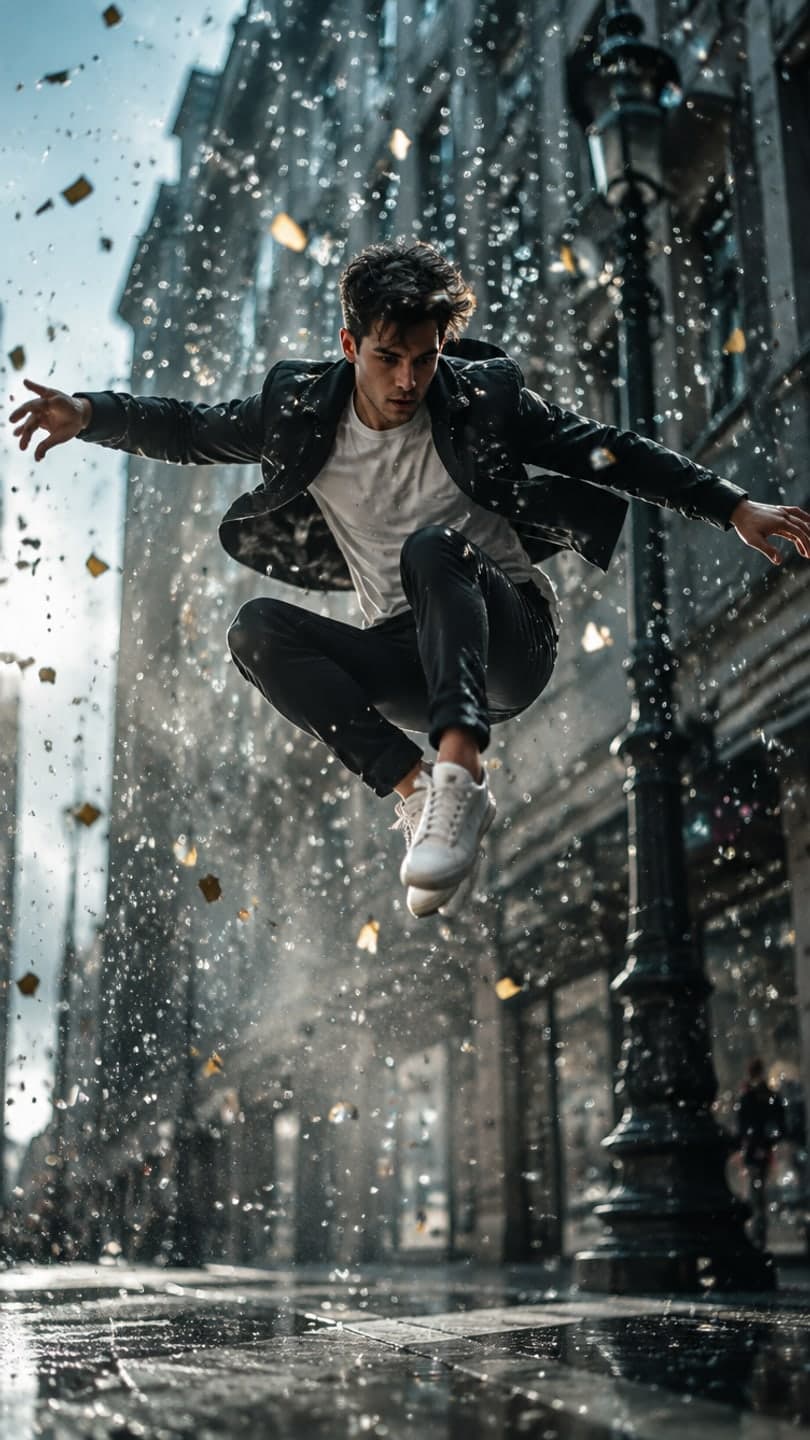 Bullet time
1 Pick a look · optional
We put you into this example — everything else stays as it is — then it moves like the example, at no extra cost.
Failed renders refund credits
What is an AI video effect, and why are they everywhere?
An AI video effect, sometimes called a template or preset, is a finished idea with the hard part already decided: the scene, the camera move, the lighting and what happens. You bring one photo and the effect rebuilds the shot with you in it, then animates it. The result is a five-second clip that would otherwise need a film crew, a green screen or a lot of editing skill.
They took off because they match how short video spreads. A good effect is a single visual idea that reads in the first second, it is easy to copy (everyone has a selfie), and every person who tries it gets a different result because it's their own face. When a few creators post the same effect, it becomes a format, and the format becomes a trend.
On Dromana these are called looks. Each one has a page with the example, what's in the shot, how it moves and what it costs, so you know what you'll get before you spend anything. Browse them all on the looks page.
What is the bullet time effect?
Bullet time freezes a moment while the camera keeps moving. You hang in mid-air, confetti and water droplets suspended around you, while the camera orbits smoothly around; then time snaps back and you land. It's the famous action-movie shot from the late 90s, and it has come back as an AI effect because a single jumping photo is enough to fake it convincingly.
Step 1
Find a photo with energy
A jump, a step or a dynamic pose works best. A standing photo is fine too; the effect will lift you off the ground.
Step 2
Use the bullet time look
Open bullet time, add your photo, and generate. It uses 70 credits.
Step 3
Cut on the landing
Trim the clip so the snap back to normal speed lands on a beat in your sound.
Try this look on your own photo.
Make it with my photoWhat are the AI ride effects, like riding a reindeer or a dolphin?
Ride effects put you on the back of an animal or a vehicle in a dramatic landscape: dolphins, penguins, dragons, horses and, for the holidays, reindeer. They became popular in 2026 because they're funny and wholesome at the same time, and they work for any age, which makes them a family-group-chat favorite.
The seasonal one we'd start with is the reindeer ride: a gallop through a snowy pine forest at dusk with snow spraying up. For a ride of your own, describe it in AI Video after uploading your photo, for example "riding a giant sea turtle through a coral reef, sunlight from above, slow tracking shot".
What is the lost-in-a-book effect?
Lost in a book shows a tiny version of you walking into the pages of a giant open book, where the pages rise into a miniature fairytale world with mountains, a waterfall and a castle. The camera dives in after you. It's popular with readers on BookTok and with anyone who likes cozy, magical edits.
Try the lost in a book look with a full-body photo. Bright clothing helps, because the figure is small in the frame; the example uses a yellow raincoat for that reason. It's a good one for an announcement post, like a reading challenge or a new chapter in your life.
How does the fan transition work?
The fan transition is an outfit-change trick. The camera looks straight down at you lying on a rug or bed, a giant blurred fan blade sweeps across the frame, and every time it passes you're in a new outfit, in exactly the same pose. Fashion creators use it for "one top, four ways" and fall outfit roundups.
The real version needs a tripod above you and several outfit changes. The fan transition look starts from one overhead photo and generates the swaps for you. For full control over each outfit, make the stills first in AI Image, then stitch them together; our fit check video guide shows how.
Which other effects are trending right now?
- Snow globe: you inside a shaken glass globe. The holiday effect of the year.
- Slow-mo squad walk: three friends walking toward the camera in dramatic slow motion.
- Broomstick flight: flying past the full moon. A Halloween favorite.
- Time-travel vlog: a selfie vlog in an ancient city with soldiers behind you.
- Costume reveal walk: low angle on your shoes, tilt up to the full look.
- Sunset wedding: the cinematic veil-in-the-wind wedding film shot.
- Light trails: neon streaks around a product, for tech sellers.
New looks go up every week, and the newest ones are marked NEW on the home page for their first two weeks.
How do I get the best result from any AI effect?
Almost every bad AI effect result comes from the photo, not the effect. The face match needs to see your face clearly, and the scene needs to understand how your body is posed. These rules fix most problems:
- Use a recent photo with your face clearly visible, facing the camera or slightly turned.
- Avoid sunglasses, heavy filters, beauty mode and strong shadows across the face.
- Match the framing to the effect: full body for walks, rides and dances; close-up for makeup.
- One person per photo for solo effects; for group looks, everyone's face should be visible.
- If the first result isn't right, change one thing in the prompt and try again rather than rewriting everything.
More detail in our guide to the best photos for AI video. If a clip fails or the model turns it down, your credits are returned automatically.
Questions people ask
What does an AI video effect do?
It takes one photo and rebuilds a ready-made scene with you in it, then animates it with a set camera move and action, giving you a short vertical clip.
Are AI video effects free?
You can start free: new accounts get 70 credits with no card, and a look video uses 70. You also get 35 more credits every day you visit.
Why does my face look different in the effect?
Usually the photo: low light, a side angle, sunglasses or a heavy filter. Use a clear, front-facing photo in even light.
Can I use AI effects on photos of my friends?
Only with their permission. Don't upload photos of people who haven't agreed, and never of minors who aren't your own children.
Do AI effect videos have sound?
No, they're silent. Add the trending sound in TikTok or Instagram so your video joins the trend.
How long are AI effect videos?
Looks make 5-second clips. In AI Video you can choose longer clips for your own prompts.
Can I use an AI effect for my business?
Yes, if you made it on a paid plan or with a credit pack you bought. Results made only with free credits are for personal use.
Effects from this guide
 Make a photo moveUpload one photo, get a 5-second video in a minute or two: a smile, a head turn, wind in the trees, waves rolling in. Works on portraits and landscapes, free to try.
 Cinematic photo filterGive travel and city photos a film-still grade: wet neon streets, blue-hour skylines, golden sunrise flare. Same place, same framing, far more mood.
Keep reading
 How to make a photo move: 4 ways, ranked4 min read
 What photos work best for AI video? The pre-upload checklist4 min read
 40 image-to-video prompts that actually work4 min read
 Runway alternatives for quick social videos: 7 tools compared4 min read
 The 10 best AI image-to-video and photo-to-video tools in 2026, by what you want to make6 min read
Ready to make yours?
Add one photo and get the look from this guide.