How to make a slow-motion video from a photo
By Claire Ye, Editor-in-chief, AI imaging · Updated · 4 min read
the short version
You can make a slow-motion clip from one photo by asking an image-to-video tool for slow motion directly: a hair flip, a walk toward the camera, a splash, falling confetti or a product reveal, each stretched out and dreamy. Describe one action, say "slow motion" and keep the camera calm. It's one of the most flattering effects AI video does well.
AI Photo to Video
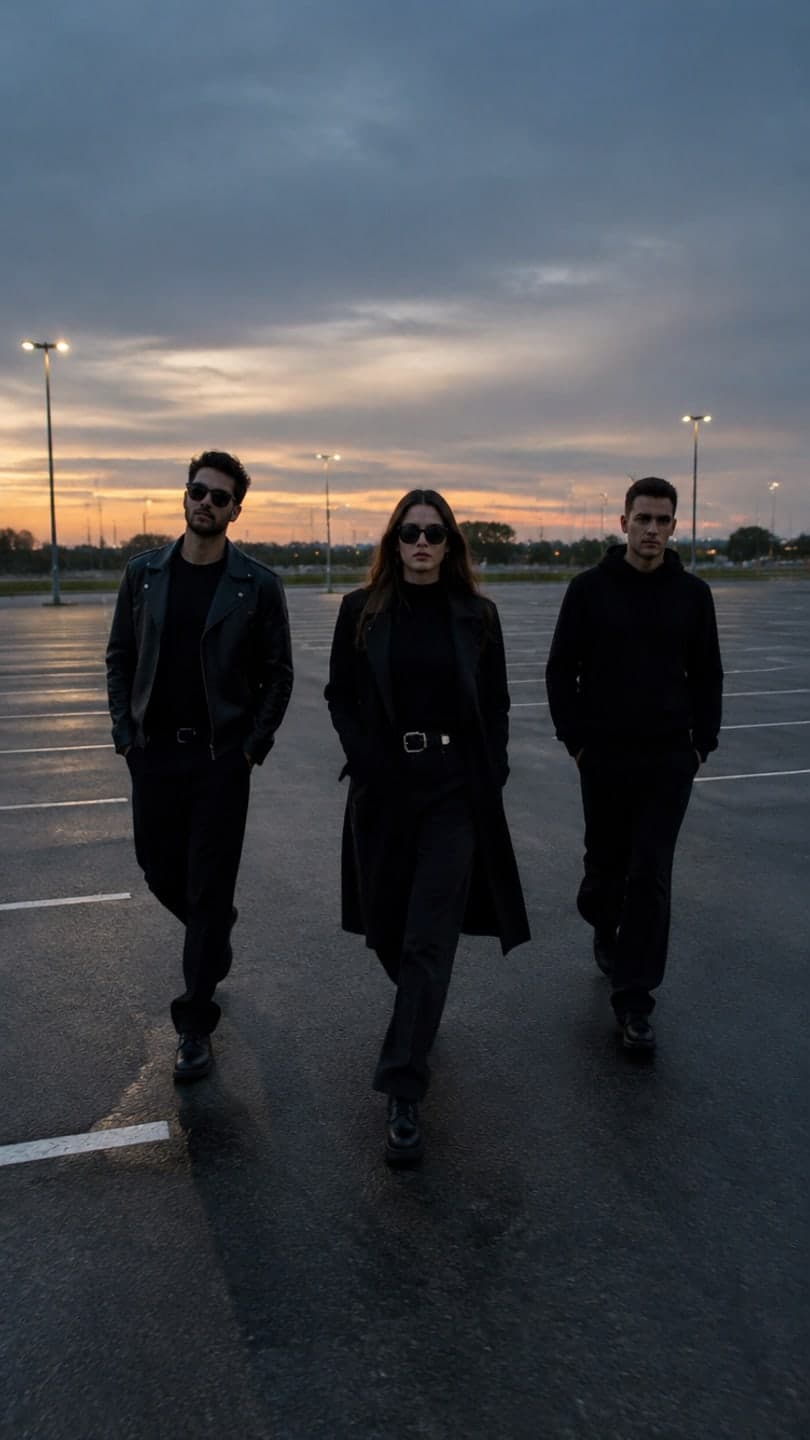 Slow-mo squad walk
1 Pick a look · optional
We put you into this example — everything else stays as it is — then it moves like the example, at no extra cost.
Failed renders refund credits
Why does slow motion work so well with AI?
Slow motion is forgiving. With less happening per second, the model has more room to keep details consistent, so faces, hair and fabric stay cleaner than in fast action. It also looks expensive: slow motion is what music videos and ads use to make an ordinary moment feel cinematic. A simple walk, slowed down, can look like a movie poster.
You don't need a high-frame-rate camera. The model generates the slowed motion itself from your still photo.
Which moments look best in slow motion?
- A hair flip or a head turn with hair swinging.
- Walking toward the camera, coat or dress moving.
- A group walking side by side, like a movie poster.
- Water: a splash, a pour, waves breaking.
- Confetti, petals or snow falling.
- A product dropping, spinning or being revealed.
Try this look on your own photo.
Make it with my photoHow do I make it step by step?
Step 1
Choose your photo
Sharp, with the subject clearly visible and something that can move.
Step 2
Upload it
Drop it into AI Video, or the make a photo move page if you want the scene unchanged.
Step 3
Describe the action in slow motion
"slow motion, she flips her hair and turns toward the camera, golden light".
Step 4
Keep the camera calm
Add "static camera" or "slow push in" so the slow motion reads clearly.
A 5-second clip on Dromana uses 70 credits. New accounts get 70 free credits with no card.
Which prompts work for slow motion?
- "slow motion, he walks toward the camera, coat moving in the wind, city lights behind"
- "slow motion, she spins and her dress flares out, sunset light"
- "slow motion, champagne pours into a glass, bubbles rise"
- "slow motion, confetti falls around them as they laugh"
- "slow motion, the sneaker drops onto wet pavement, water splashes"
For other actions and camera moves, see our image-to-video prompts guide.
Can I make a slow-motion squad walk?
Yes, it's one of the most popular formats: three or four friends walking toward the camera in slow motion, like the opening of a heist movie. Use a photo of your group side by side, full length if possible. The slow-mo squad look is built for exactly this. For more group ideas, see best AI apps for group photos and videos.
Why does my slow motion look strange?
- Too much happening: ask for one action only.
- Fast camera moves fight the slow motion; keep the camera calm.
- Blurry source photo: start from a sharp one.
- Hands and fingers in close-up can warp; keep them relaxed and small in frame.
- Very long clips stretch the motion thin; five to eight seconds is best.
How long should a slow-motion clip be?
Five to eight seconds. Slow motion stretches one action across the whole clip, so a single hair flip or a few steps fills five seconds nicely. Longer clips start to look like nothing is happening. If you need more, make two or three short slow-motion clips of different moments and cut them together, which also gives you a natural rhythm for music. For social posts, end on the strongest frame, like the face turning to the camera, so the loop restarts on something interesting.
- Five to eight seconds per slow-motion moment.
- Cut several short clips together for longer edits.
- End on the strongest frame so the loop restarts well.
How do I use slow-motion clips?
Slow-motion clips make strong openers for Reels and TikToks, cinematic transitions in a montage and eye-catching product ads. Pair them with a song that has a slow build or a bass drop at the end. For product ideas, see product video from one photo; for cinematic looks, see cinematic photo tips.
Questions people ask
Can AI make a slow-motion video from a photo?
Yes. Ask for slow motion directly and describe one action, like a hair flip or a slow walk.
Which moments look best in slow motion?
Hair flips, walks, spins, splashes, pours, falling confetti and product reveals.
What prompt should I use?
Start with "slow motion", describe one action and add "static camera" or "slow push in".
Can I make a slow-motion group walk?
Yes. Use a full-length photo of your group or the slow-mo squad look.
Why does my slow motion look odd?
Usually too much action or a fast camera move; simplify and keep the camera calm.
How much does a clip cost?
A slow-motion clip of five seconds costs 70 credits on Dromana; you start with 70 free credits.
Effects from this guide

Keep reading
 40 image-to-video prompts that actually work4 min read
 Product video from one photo: short ads for TikTok Shop, Reels and your store4 min read
 How to make your pics look cinematic (even on a phone)4 min read
 How to turn a selfie into a video with AI4 min read
 Viral AI video effects explained: bullet time, rides, snow globes and more6 min read
Ready to make yours?
Add one photo and get the look from this guide.