Best AI apps for group photos and videos with friends
By Sebastian Ward, Reviews and comparisons editor · Updated · 4 min read
the short version
Friend-group trends, like matching pajamas, squad slow-motion walks and trio dances, are some of the most shared posts on TikTok and Instagram. Dromana recreates these group scenes from one photo of your friends. Viggle copies dance moves, Pika adds effects, Canva builds the carousel and Luma adds cinematic motion. Groups of two to four people work best.
AI Photo to Video
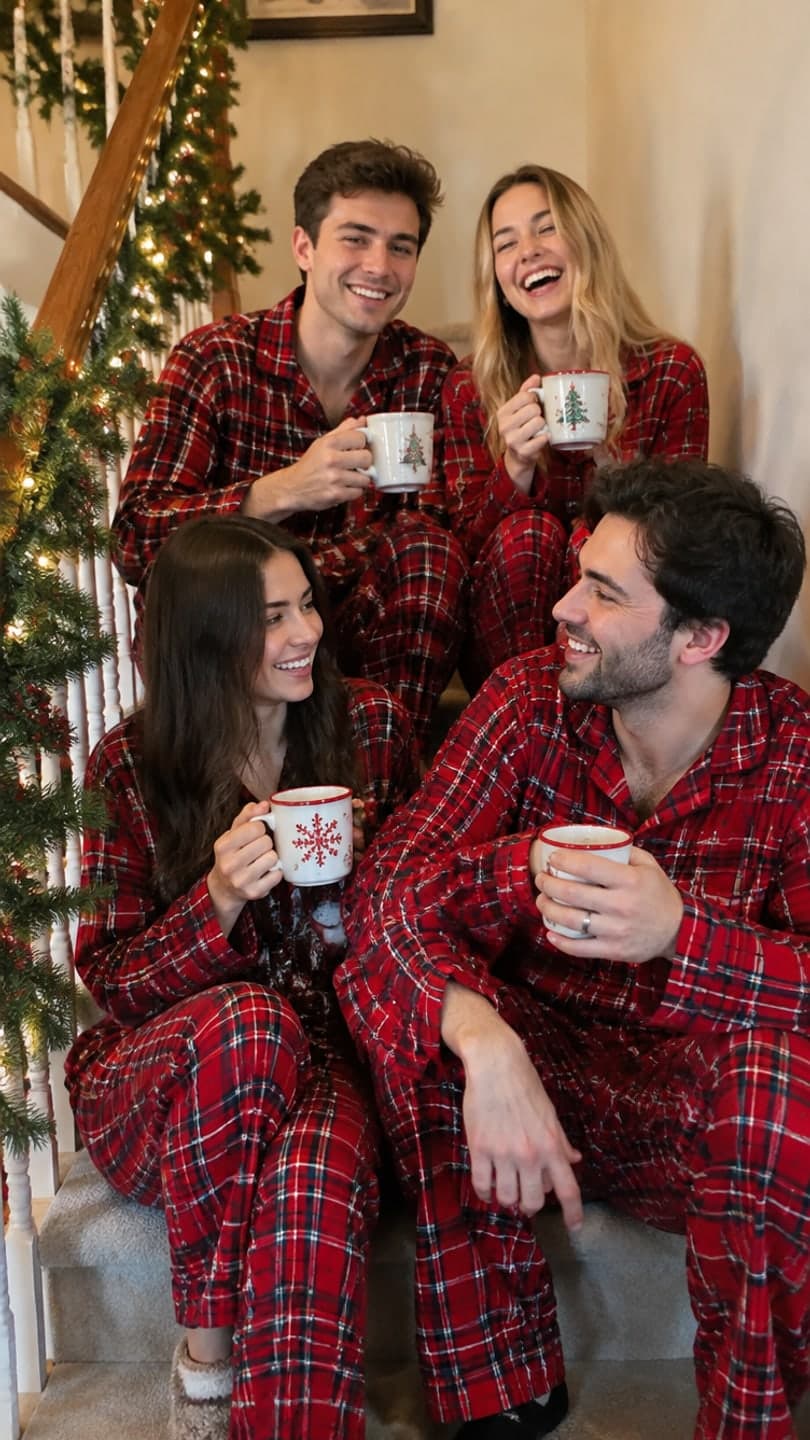 Matching pajamas
1 Pick a look · optional
We put you into this example — everything else stays as it is — then it moves like the example, at no extra cost.
Failed renders refund credits
Why are friend-group AI videos so popular?
Group posts get shared by everyone in them, so they travel further than solo posts. The formats are simple and repeatable: everyone in matching outfits, a walk toward the camera in slow motion, a synchronized dance in a parking lot, a flash-lit party shot. The hard part is getting everyone together in the right place with the right clothes. AI apps solve that by rebuilding the scene from a photo you already have.
One note before the list: Dromana is our product. It's included because group looks are one of the things it's built for, and we've said where other tools are a better fit.
Which AI apps are best for group photos and videos?
- Dromana: recreates group trend scenes, like matching pajamas or a squad walk, from one photo of your friends.
- Viggle: puts a group into a dance or motion template for meme edits.
- Pika: quick effects for funny group reactions.
- Luma Dream Machine: slow, cinematic motion for a moody group shot.
- Canva: turns the results into a carousel, collage or birthday post.
- Picsart: stickers, cutouts and edits on top of a group photo.
Try this look on your own photo.
Make it with my photoWhich group trends can I recreate?
These Dromana looks are designed for small groups and keep each person recognizable:
- Pajama squad: matching holiday pajamas on the couch, a December favorite.
- Slow-mo squad: walking toward the camera in slow motion like a movie poster.
- Parking lot trio: a synchronized dance under parking lot lights.
- Pop trio: a glossy pop-group shoot.
- House party: flash-lit party energy.
- Friendsgiving: a cozy dinner table scene for November.
A look video uses 70 credits and a still uses 10. New accounts get 70 free credits with no card, enough to try one group video.
How do I take a group photo that works with AI?
Group photos are harder for AI than selfies, because each face is smaller and people overlap. A few habits make a big difference:
- Keep it to two to four people; bigger groups lose detail on each face.
- Stand shoulder to shoulder at the same distance from the camera.
- Everyone faces the camera with eyes open; no one hides behind someone else.
- Shoot from chest up, in soft, even light.
- Take several shots and pick the sharpest one.
How do I post group clips so they get shared?
Step 1
Make one clip per trend
Matching pajamas in December, a squad walk for a birthday, a dance for a reunion.
Step 2
Write a caption your friends will quote
An inside joke or a role for each person works well.
Step 3
Tag everyone
Each tag puts the post in front of another set of followers.
Step 4
Post as a collab
On Instagram, invite friends as collaborators so it appears on all your profiles.
Our best friend photoshoot ideas guide has more themes, and photo dump ideas shows how to mix AI shots with real ones.
Do I need my friends' permission?
Yes. Everyone in the photo should be happy with an AI version of themselves being posted. Ask in the group chat first, and delete a clip if someone doesn't like it. Don't use photos of people who aren't in on it, and label realistic AI content when you post; our AI labeling guide explains the rules for TikTok and Instagram.
Which group app should I use?
- Recreating a group trend scene: Dromana.
- A group dance meme: Viggle.
- A funny effect: Pika.
- A finished carousel or birthday collage: Canva.
Upload a photo of your friends in AI Video, or start with the make a photo move page to animate the original photo.
Questions people ask
What is the best AI app for friend-group videos?
Dromana for recreating group trend scenes from one photo; Viggle for group dance memes; Canva for carousels and collages.
How many people can be in an AI group video?
Two to four works best. Larger groups lose detail on each face.
Can I make a matching pajamas video with AI?
Yes. The pajama squad look puts your group in matching holiday pajamas from one photo.
Why does AI mix up faces in group photos?
Faces that are small or overlap are hard to tell apart. Use a close, sharp photo with space between heads.
Can I try group looks for free?
Dromana gives 70 free credits on sign-up, enough for one group look video, plus 35 more each day you visit.
Do I need permission to post AI videos of friends?
Yes. Ask everyone in the photo before posting.
Effects from this guide

Keep reading
 Best friend photoshoot ideas: 30 poses and themes for two (or three)4 min read
 Best AI dance video apps in 2026: make anyone dance from a photo4 min read
 35 photo dump ideas that don't feel random4 min read
 The kiss cam AI trend: put yourself on the big screen at a concert4 min read
 Friendsgiving photo ideas: table shots, group poses and cozy clips4 min read
Ready to make yours?
Add one photo and get the look from this guide.