Best AI video apps for Instagram Reels and Stories in 2026
By Sebastian Ward, Reviews and comparisons editor · Updated · 4 min read
the short version
For Instagram, use one app to make the clip and one to finish it. Dromana turns one photo into an aesthetic or trend clip of you or your product; Instagram's own Edits app and Captions handle cutting and subtitles; Canva and Adobe Express add text and branding; Higgsfield and Pika add effects. Keep Reels vertical, short and strong in the first second.
AI Photo to Video
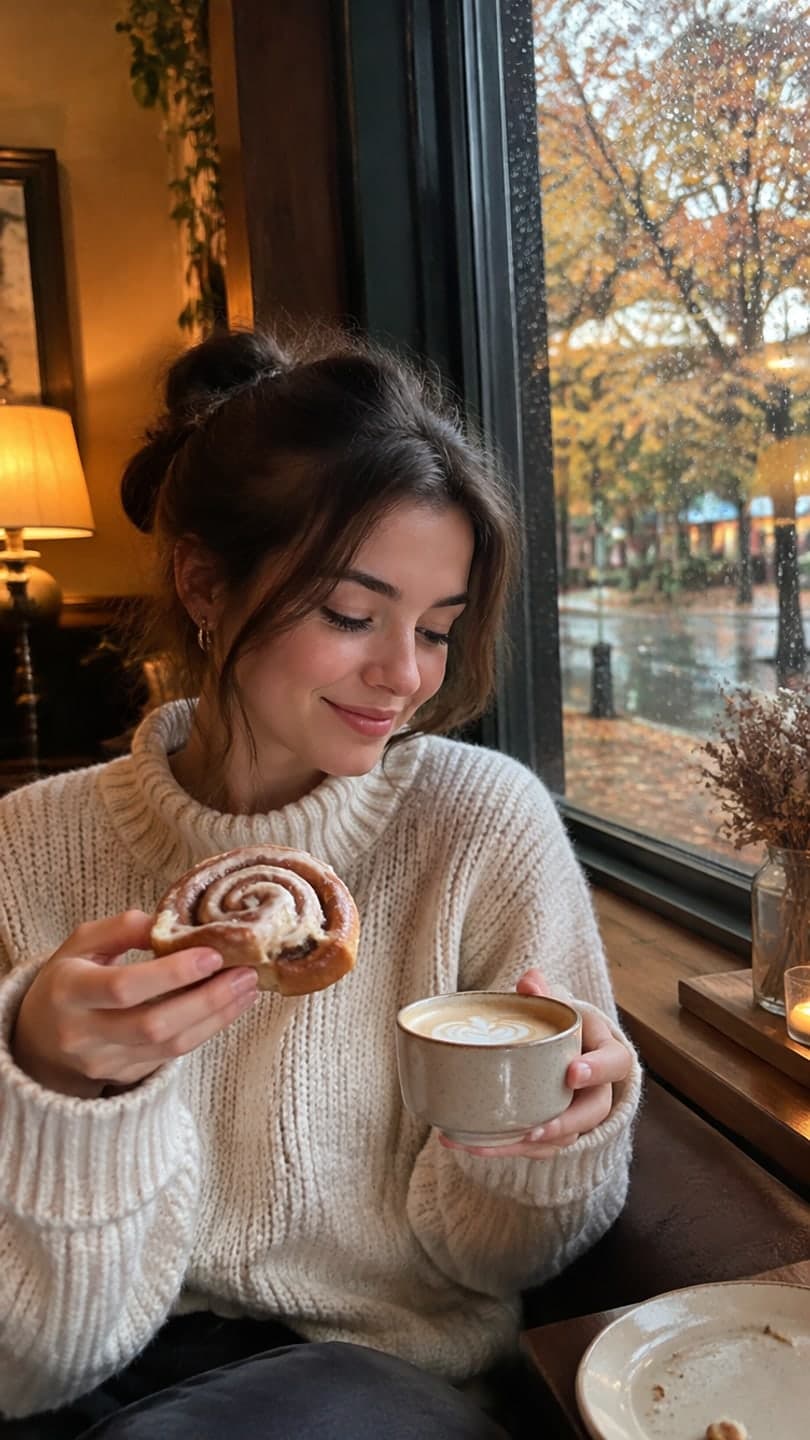 Hello October café
1 Pick a look · optional
We put you into this example — everything else stays as it is — then it moves like the example, at no extra cost.
Failed renders refund credits
What does a good Instagram Reel need?
Instagram rewards a slightly different style from TikTok. Reels that do well tend to be more aesthetic and polished: a clear visual mood, good light, a strong first frame that also works as the cover in your grid, and a caption or on-screen line that makes people save or share. Carousels are also back in favor, and short clips mixed into a carousel often get more saves than a Reel alone.
- Vertical 9:16, with the important part centered so the grid crop still works.
- A first frame that stops the scroll and doubles as the cover.
- A consistent aesthetic across your posts.
- Captions or on-screen text, since many people watch muted.
- A sound from Instagram's library, added in the app.
Disclosure: Dromana is our product. It makes clips; for cutting and captions we point you to other apps that do that part better.
Which AI video apps are best for Instagram?
- Dromana: aesthetic and trend clips from one photo, like a cozy October café reel, an October fit check or a snow globe.
- Edits: Instagram's own video editor for cutting clips, adding text and publishing straight to Reels.
- Captions: auto-subtitles and AI edits for talking-head Reels.
- Canva: Reel and Story templates with brand kits and text.
- Adobe Express: a design-first editor with templates and generative tools.
- Higgsfield: viral effect presets and camera moves for eye-catching Reels.
- Remini: sharpens and restores photos before you post or animate them.
Try this look on your own photo.
Make it with my photoWhich app is best for aesthetic Reels?
Aesthetic Reels live on mood: soft light, rain on a window, steam from a cup, falling leaves. Dromana's looks are built around exactly these shots and keep your face and outfit from the photo. Good starting points for autumn and winter are the Hello October café, rainy café study, October fit check, cozy cabin and Christmas market. Each look video uses 70 credits, and a new account starts with 70 free credits, no card.
If you'd rather build the aesthetic yourself, our guides to dark academia, coquette and old money photos explain the outfits, light and grade.
How do I make an AI Reel from a photo?
Step 1
Pick a look or write one sentence
Choose a look on the looks page, or upload a photo to AI Video and describe the motion.
Step 2
Generate the clip
It's ready in a minute or two, vertical and silent.
Step 3
Finish it
Add a text line and trim in Edits, Canva or Instagram's own editor.
Step 4
Add a sound in Instagram
Pick from the audio library so the Reel can show up under that sound.
Step 5
Choose the cover
Pick a frame that looks good in your grid.
Which app is best for Instagram Stories?
Stories are casual and short-lived, so speed matters more than polish. Templates in Canva and Adobe Express are quick for text-heavy Stories like announcements and polls. For a fun Story moment, a five-second clip of you in a seasonal look, such as the snow globe or tacky lights house, works well with a sticker or a question box on top.
Which app is best for business and product Reels?
Brands and shops on Instagram need on-brand clips often. Dromana's product looks, like cozy candle, water ripple and gift guide flat lay, keep your product's shape, label and color, and results made on a paid plan or with a bought credit pack can be used commercially. Add your logo and offer in Canva or Adobe Express. More in our best AI product video tools comparison.
Which Instagram AI video app should I pick?
- Aesthetic or trend clips of you or your product: Dromana.
- Cutting and posting Reels quickly: Instagram's Edits app.
- Subtitles on talking Reels: Captions.
- Branded Stories and text posts: Canva or Adobe Express.
- Eye-catching effects: Higgsfield.
- Sharpening a photo before posting: Remini.
Instagram asks you to label realistic AI-generated content; our guide to labeling AI content explains how.
Questions people ask
What is the best AI video app for Instagram?
Use two: Dromana to make an aesthetic or trend clip from a photo, then Instagram's Edits app, Canva or Captions to finish it.
How do I make an Instagram Reel with AI?
Generate a vertical clip from a photo, add a text line and trim it, then add a sound from Instagram's audio library and choose a cover.
Which AI app is best for aesthetic Reels?
One with mood-driven looks, such as Dromana's café, rainy study, cozy cabin and fit-check looks, which keep your face and outfit.
Do I need to label AI Reels on Instagram?
Instagram asks you to label realistic AI-generated content. Use the AI label option when posting.
What size should an Instagram Reel be?
Vertical 9:16, ideally 1080x1920, with key content centered so the grid crop still looks good.
Is there a free AI video app for Instagram?
Most have free tiers. Dromana gives 70 credits on sign-up with no card, enough for a first look video.
Effects from this guide
 Outfit video from a photoTurn one outfit photo into a 5-second fit check video: a turn, a walk, fabric moving. No tripod, no filming. 70 free credits to start.
 Cinematic photo filterGive travel and city photos a film-still grade: wet neon streets, blue-hour skylines, golden sunrise flare. Same place, same framing, far more mood.
Keep reading
 Best AI video apps for TikTok and Reels creators in 20264 min read
 Canva AI video alternatives: 7 tools for making and editing social videos4 min read
 35 photo dump ideas that don't feel random4 min read
 The Instagram Restyle AI trend: how it works and how to make it move4 min read
 Best AI influencer generators in 2026: virtual influencers, AI creators and you in every trend5 min read
Ready to make yours?
Add one photo and get the look from this guide.