Best AI influencer generators in 2026: virtual influencers, AI creators and you in every trend
By Sebastian Ward, Reviews and comparisons editor · Updated · 5 min read
the short version
AI influencer tools do three different jobs. Character studios like Higgsfield build a virtual influencer who doesn't exist. Avatar tools like HeyGen, Hedra and Captions make a face talk to camera, and ad tools like Arcads and Creatify cast AI actors in UGC ads. Dromana, our product, puts you into trending influencer-style shots and short videos from one selfie. Pick by whose face it is and whether it needs to speak.
AI Photo to Video
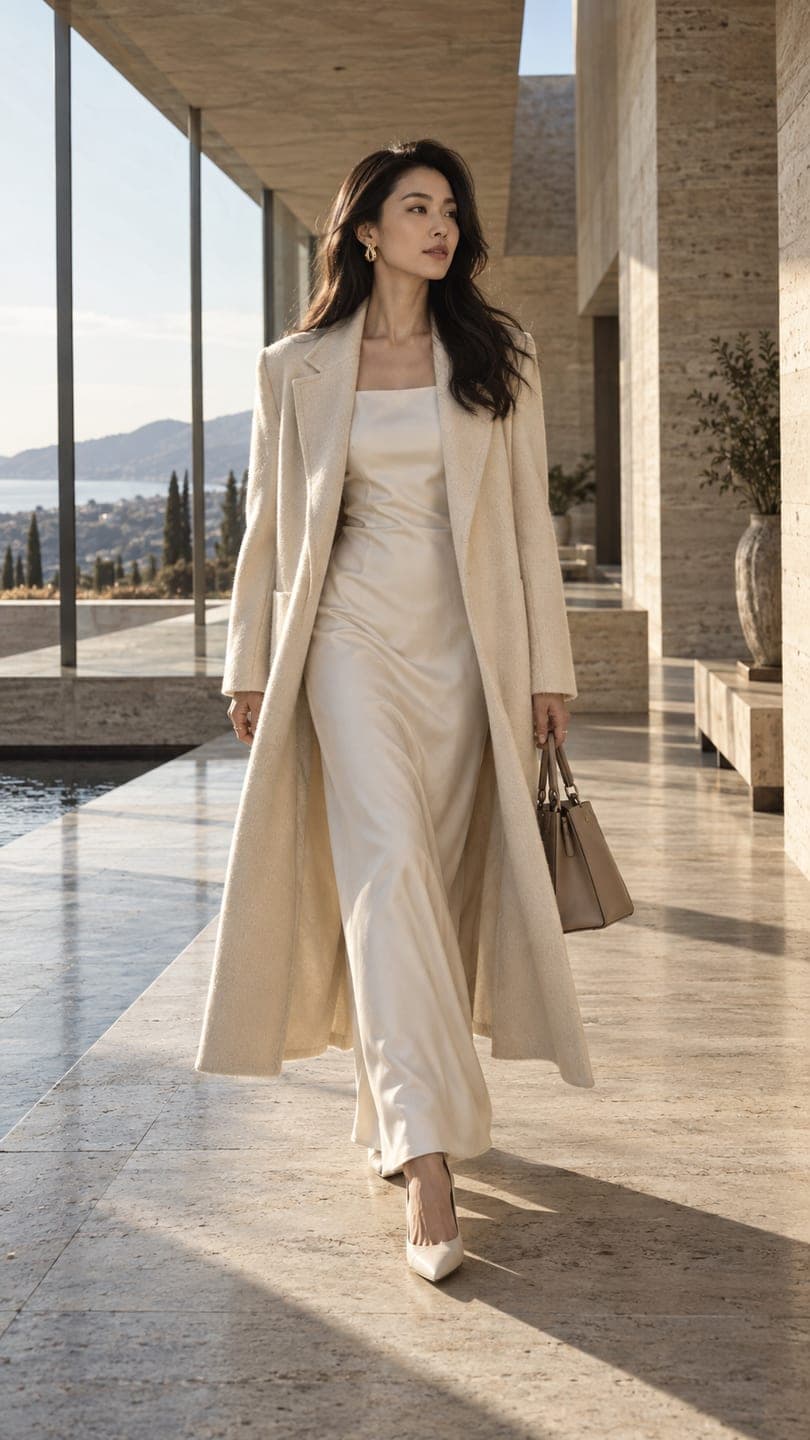 Quiet luxury
1 Pick a look · optional
We put you into this example — everything else stays as it is — then it moves like the example, at no extra cost.
Failed renders refund credits
What is an AI influencer generator?
“AI influencer” covers one quite different thing. One is a virtual influencer: an invented person with a consistent face, posted as if they were real, sometimes with brand deals. The other is a real creator using AI to produce more content of themselves: outfits, places and trend shots they never had to stage. Most tools are built for one or the other, so the first question is whose face goes in the post.
Disclosure: Dromana is our own product and is included below, in the “you, in the shot” category. We've described every tool by what it is built for, not by a test score.
Which AI influencer tools are best?
- Higgsfield: an AI influencer studio for building a virtual character and placing it in scenes and videos, alongside many other creative tools.
- Dromana: you as the influencer, from one selfie, in ready-made trend looks (quiet luxury, catwalk, paparazzi, festival, seasonal trends), with a 5-second video from each still.
- HeyGen: talking avatars and presenter videos, including from your own footage, for spoken content in many languages.
- Hedra: expressive character videos that speak and sing from an image and audio.
- Captions: AI creators and editing for talking-head social videos.
- Arcads and MakeUGC: AI actors reading your script for UGC-style ads.
- Creatify: turns a product link into short video ads with AI presenters.
- Synthesia: presenter avatars for training and business explainer videos.
Try this look on your own photo.
Make it with my photoDo I want a virtual influencer or AI content of myself?
A virtual influencer gives you full creative control and nobody's real identity, but it starts with zero trust: audiences want to know who is behind it, and most platforms and advertising rules expect AI personas to be labelled. Building one is a long project, because consistency of the face across hundreds of posts is the hard part.
AI content of yourself is quicker to pay off. Your followers already know you, so a new outfit, city or aesthetic reads as you having fun, not as a stranger. That's the category Dromana is built for: you upload one photo, pick a look like quiet luxury, catwalk strut or paparazzi flash, and get a still and a short vertical clip with your face.
Which one should I use for talking videos?
If the post needs you to speak, lip-sync to a script or translate your voice, use a talking-avatar tool such as HeyGen, Hedra or Captions. Dromana makes silent clips: motion, poses and camera moves, no speech. Many creators pair the two, using a trend clip as the hook and a talking clip for the message.
How do I make influencer-style content of myself with Dromana?
Step 1
Pick a look
Browse looks or start from the AI fashion portrait for editorial stills.
Step 2
Upload one clear selfie
Face visible, even light, no heavy filter; a full-length photo helps with outfit looks.
Step 3
Generate the still, then the clip
A look video uses 70 credits for 5 seconds. New accounts get 70 free credits with no card, enough for one.
Step 4
Post with a label
Mark it as AI-edited where the platform asks, and post the still and the clip as separate posts.
What should I check before choosing?
- Whose face: an invented character, your own, or an actor's.
- Speech: does the content need to talk or lip-sync?
- Rights: can you use the results commercially, and does the tool train on your uploads?
- Watermarks: free tiers usually watermark; check what a plan removes.
- Cost per post: compare what one usable still or 5-second clip costs, not just the monthly price.
On Dromana, results made on a paid plan or with credits you bought can be used commercially, and plans remove the watermark; Starter's first month is $4.99 if you've never paid. For headshots and profile pictures, see our AI headshot generator and AI avatar generator comparisons.
What about disclosure and brand deals?
Label realistic AI images and videos with the platform's AI tag, and keep normal sponsorship disclosures for paid posts. Don't use AI to show a product doing something it can't, and never put another real person's face into your content without their permission. Our safety page lists what Dromana doesn't allow.
Questions people ask
What is the best AI influencer generator?
It depends on the job: a character studio like Higgsfield for a virtual influencer, HeyGen or Hedra for talking avatars, Arcads or Creatify for AI actors in ads, and Dromana for putting yourself into trending shots and videos from one selfie.
Can I make AI influencer content of myself for free?
On Dromana, yes, to start: new accounts get 70 free credits with no card, enough for one 5-second video. Free results carry a small watermark.
Can Dromana make an AI influencer talk?
No. Dromana makes silent motion clips. For speech or lip-sync, use a talking-avatar tool and pair it with a Dromana trend clip if you like.
Do I have to label AI influencer posts?
Most platforms ask you to label realistic AI content, and sponsored posts still need the usual ad disclosure.
How do I keep my face consistent across posts?
Use the same clear selfie for every look, with similar light, and stick to a few looks that suit your aesthetic.
Can I use the results for brand deals?
Results made on a paid plan or with bought credits can be used commercially. Results made only with free credits are for personal use.
Effects from this guide
 AI fashion portraitSkip the photographer: get a magazine-style fashion portrait from one selfie. Quiet-luxury coats, street editorial, studio light. Same face, new shoot. Free to try.
 Outfit video from a photoTurn one outfit photo into a 5-second fit check video: a turn, a walk, fabric moving. No tripod, no filming. 70 free credits to start.
Keep reading
 Best AI avatar generators in 2026: profile pictures, styles and moving avatars4 min read
 Best AI headshot generators in 2026: one selfie vs. training packs5 min read
 Best AI UGC ad tools: creator-style product videos without hiring creators4 min read
 AI influencer photos from a selfie: shoot-free content that still looks like you4 min read
 Christmas card photo ideas for families, couples, friends and pets4 min read
Ready to make yours?
Add one photo and get the look from this guide.