An anniversary video from old photos: their wedding day, restored and moving again
By Daniel Hughes, Safety, rights and family memories · Updated · 4 min read
the short version
For a 25th, 40th or 50th anniversary, gather the couple's wedding photos and pictures from each decade, restore and colorize the faded ones, bring the wedding portrait to life so they smile at each other again, and cut it all into a two-to-three-minute video set to their wedding song. Play it at the party or send it to the family the morning of the day.
AI Photo to Video
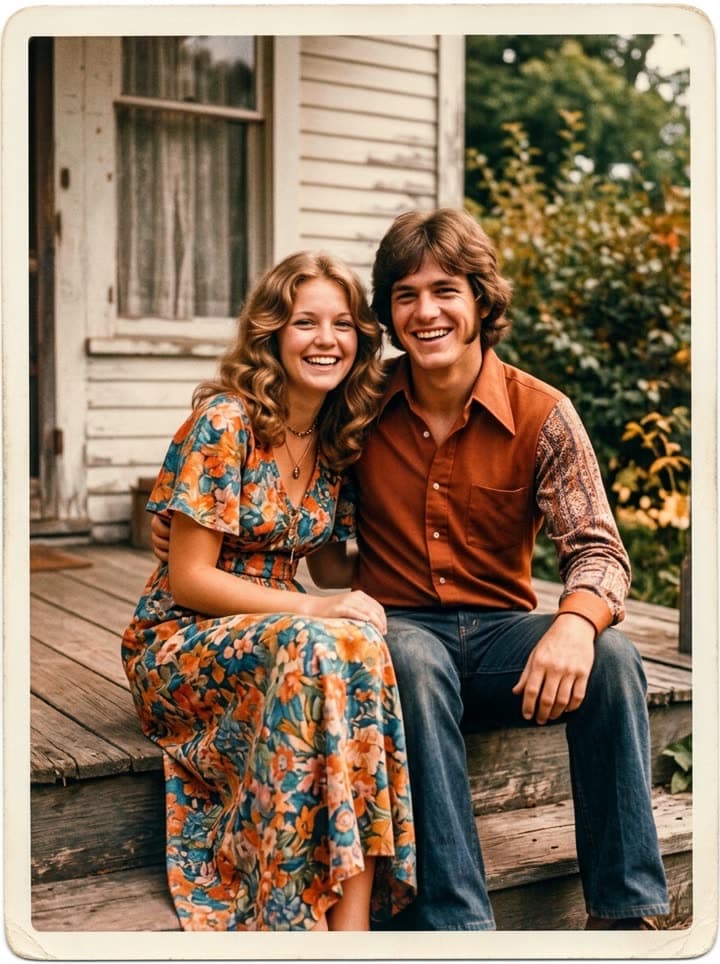 Old photo comes alive
1 Pick a look · optional
Describe what happens, in your own words. To change outfit or place, pick a look or switch on New outfit or scene.
Failed renders refund credits
Why the wedding photo is the centrepiece
For couples married in the 1960s, 70s and 80s, the wedding album is often the only professional photography they ever had, and by now the prints have yellowed, faded or picked up fingerprints and scratches. Seeing that day restored, crisp and bright, and then watching the two of them blink and smile at each other as they did fifty years ago, is the moment that makes an anniversary party go quiet.
It's a gift children and grandchildren can make in an evening, and it means more than anything bought.
Collecting the photos
- The wedding: portraits, the ceremony, the first dance, the cake, the guests.
- Before: each of them as a child and how they looked when they met.
- Early years: the first home, the first car, the children arriving.
- Each decade: holidays, birthdays, the haircuts and outfits everyone will laugh at.
- Now: a recent photo of them together, which makes a perfect last frame.
Try this look on your own photo.
Make it with my photoRestoring and animating the wedding portrait
Step 1
Scan the album
Take prints out of the album or photograph them flat in daylight. Our scanning guide covers glare and sticky pages.
Step 2
Restore the faded ones
Restore old photos fixes fading, color casts, scratches and creases, keeping both faces exactly as they were.
Step 3
Bring the portrait to life
Upload the restored wedding portrait to bring old photos to life. Try: “Stationary camera. They turn slightly toward each other and smile; she leans into his shoulder.”
Each moving clip is 5 seconds and uses 70 credits; new accounts get 140 free credits with no card, enough for two. A plan removes the watermark for a party screen; packs start at $4.99 for 6 videos, with no subscription.
Building the video
Two to three minutes is the sweet spot: long enough to tell the story, short enough to hold a room. Open on the moving wedding portrait, then go roughly in order through the decades at about four seconds per photo, and close on a recent photo of them together, held a little longer. Use their wedding song, or a hit from the year they married.
Short captions help younger guests follow along: the year, the place, and a word or two like “first apartment” or “road trip to the coast”. Keep the text small and at the bottom so the photos stay the focus, and leave the moving portraits uncaptioned, so the room can simply watch them smile.
Any free phone or desktop video editor will do. Add a title card with their names and the date, and maybe a line from each child or grandchild at the end.
Ideas by anniversary
- 25th, silver: restored wedding photos next to the family they built since.
- 40th, ruby: colorize the black-and-white or faded shots, ruby-red title card.
- 50th, golden: restore the whole album and bring three or four photos to life.
- 60th and beyond: include their own parents' wedding photos, restored, for four generations in one video.
- In memory: for a couple where one partner has died, keep it gentle and ask the surviving partner first.
Sharing it on the day
Play it at the party, or send it to the family group chat on the morning of the anniversary so everyone can reply with memories. Give the couple a copy on a USB stick or a digital frame too; older relatives may not keep videos on their phones. Print the restored wedding portrait as a framed keepsake to go with it.
For more ideas, see a photo gift for grandparents and our guide to animating old photos of loved ones.
Questions people ask
How long should an anniversary video be?
Two to three minutes, about 30 to 45 photos plus a couple of moving portraits, set to one song.
Can I make my parents' wedding photo move?
Yes. Restore it first, then the bring old photos to life tool makes a gentle 5-second clip where they smile and lean together.
How do I fix faded wedding photos?
Scan or photograph them, then use the restore tool, which fixes fading, color casts, scratches and creases in about a minute.
What song should I use?
Their wedding song, or a hit from the year they married. Ask a sibling if you're not sure.
Is it free to make?
New accounts get 140 free credits with no card. A plan removes the watermark for party screens and prints.
What if one of them has passed away?
It can still be a beautiful tribute; ask the surviving partner first and keep the motion gentle.
Effects from this guide
 Bring old photos to lifeAnimate an old family photo: the people in it blink, breathe and smile again in a gentle 5-second clip. For memorial slideshows, anniversaries and family memories.
- Old photo restorationRestore old family photos with AI: remove scratches, creases, stains and fading, repair torn corners and add natural color, while every face stays exactly as it was.
 Colorize black-and-white photosColorize black-and-white and sepia photos with AI: realistic skin tones, period-true clothes and rooms, and the faces of the people you love left exactly as they were.
Keep reading
 A photo gift for grandparents: their old photos, restored and brought to life4 min read
- How to scan old photos at home with a phone or scanner, before you restore them4 min read
- Animate old photos of loved ones: see them blink and smile again, gently5 min read
 Thanksgiving family photo memories: restore the old album and share it at the table4 min read
- How much does photo restoration cost? A retoucher, an app or AI, compared4 min read
Ready to make yours?
Add one photo and get the look from this guide.