Airbnb listing videos from the photos you already have
By Noah Reynolds, Media and brand content · Updated · 4 min read
the short version
Short-stay hosts can turn the listing photos they already have into 5-second videos: curtains moving in the breeze, a pool rippling, a fire flickering, a slow push-in on the view. Upload a photo, name only what should move, and add "the camera stays still". Post the clips on Reels, TikTok and your booking site, and keep the motion honest: animate what is there.
AI Photo to Video
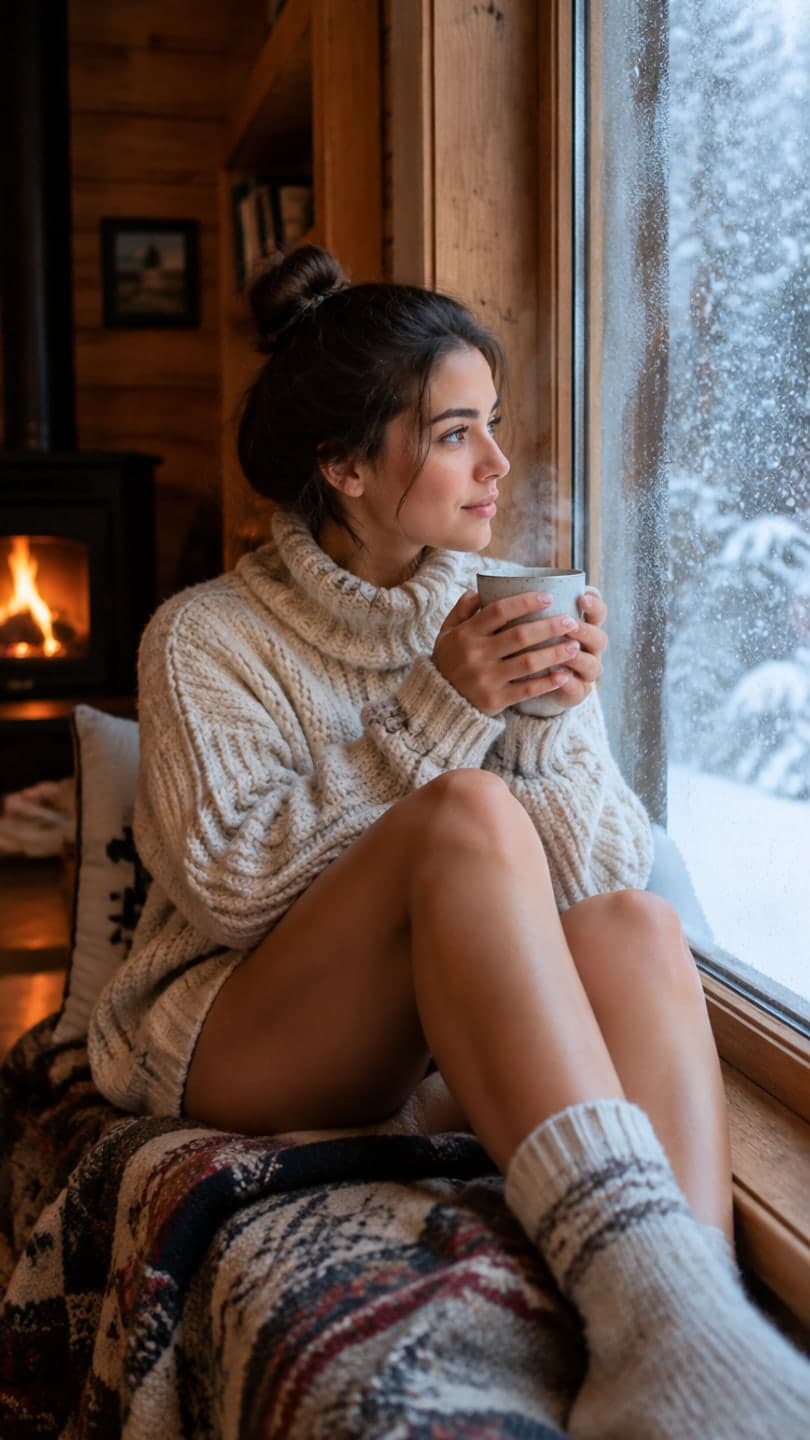 Cozy cabin
1 Pick a look · optional
We put you into this example — everything else stays as it is — then it moves like the example, at no extra cost.
Failed renders refund credits
Why a moving photo helps a rental
Guests scroll past hundreds of still photos when they plan a trip, and almost all of them look the same: a made bed, a sofa, a kitchen island. A five-second clip of the same room with the curtains lifting in the breeze or the fire flickering stops the scroll, because it feels like being there for a moment. That feeling is what you are selling.
Most booking platforms show photos in the listing itself, so these clips do their work everywhere else: Instagram Reels and TikTok, your direct-booking website, a Google Business profile, and the message you send guests before arrival. A host with one property can make a clip for every room in an afternoon, without filming anything.
What to animate, room by room
- Bedroom: sheer curtains at an open window, morning light moving across the bed.
- Living room: a fire flickering, lamp light, a plant moving slightly by an open door.
- Kitchen: steam rising from a coffee cup or a pot, light from the window.
- Pool or hot tub: rippling water and sparkle on the surface.
- View: clouds drifting, waves rolling in, trees swaying.
- Outside: a slow push-in toward the front door at golden hour.
Try this look on your own photo.
Make it with my photoMake one in about a minute
Step 1
Pick your best listing photo
Sharp, bright and straight. A vertical crop gives a vertical video for Reels and TikTok.
Step 2
Upload it
Open AI Video, or start from the hotel photo effect, which already holds a good room prompt.
Step 3
Name what moves
Write one or two things that should move and nothing else, then end with "The camera stays completely still."
Step 4
Check and download
Watch the clip once against the photo. If anything in the room changed, generate again with a tighter prompt.
For water, the water photo effect is tuned for pools and sea views, and the real estate photo effect handles exteriors with a slow camera move.
Prompts that keep the room exactly as it is
These are the prompts we used for our own examples. Copy them and swap the details:
- "Only the sheer curtains billow gently in the breeze and steam rises from the coffee cup. The camera stays completely still."
- "Only the fire flickers and the lamp light glows; nothing else moves. The camera stays completely still."
- "Only the pool water ripples and sparkles in the sun. The camera stays completely still."
- "Clouds drift slowly across the sky and the trees sway in a light breeze. Slow, steady push-in."
The words "only" and "stays completely still" do most of the work. Without them, the clip may pan or zoom, which can make a room look bigger or different from the photos guests will see.
Keep it honest
A moving photo should show the place exactly as it is. Don't add a view, a pool, a fireplace or furniture that isn't there, and don't let a clip make a room look bigger than it is. Guests compare what they saw with what they get, and a mismatch costs you far more in reviews than a pretty clip earns.
Some platforms ask you to label AI-generated or AI-edited media. Our guide on labelling AI content shows where the setting is on each social app. If a clip changes anything in the room, such as a lamp, a picture or the shape of the bed, don't post it; generate it again.
A posting plan for a season
Six to ten clips cover a typical property: one for each bedroom, the living room, the view, the outside and one seasonal detail. Post one or two a week rather than all at once. Clips of a lit fire do best from November to February; pools and views from late spring. Our guide to turning photos into TikTok videos covers captions and sounds, and the photos that animate best helps you choose which shots to start with.
What it costs
Your first two videos are free, with a small dromana.app badge. After that you can buy videos in packs, paid once with no subscription, or take the Business plan if you manage several properties and post every week. Bought videos have no badge, and once you've bought anything you can use your results in ads and on your booking site. Dromana for business shows before-and-after examples, and the pricing page has the numbers.
Questions people ask
Can I put the videos on my Airbnb listing?
Most listing galleries take photos only. Use the clips on Reels, TikTok, your booking site and guest messages, and keep the photos in the listing.
Will the video change my property?
Not if you name only what should move and add "the camera stays completely still". Check each clip against the photo before you post it.
How many videos does one listing need?
Six to ten: one per bedroom, the living room, the view, the outside and a seasonal detail.
Can I use the clips in ads?
Yes, once your account has bought any pack or plan, including clips made before you bought.
Do I need a subscription?
No. Packs are paid once. The Business plan is for hosts and managers posting every week.
What photos work best?
Sharp, bright photos with something that can move: curtains, water, fire, plants, clouds or light.
Effects from this guide
 Animate hotel and vacation rental photosTurn hotel, resort, cabin and vacation rental photos into short videos: the pool ripples, the fire flickers, curtains move, clouds pass. For booking pages and Reels.
 Animate water in a photoMake the water in a photo move: a waterfall that pours, waves that roll in, a river that flows or a pool that ripples, while rocks, sand and buildings stay still.
 Animate real estate photosTurn a listing photo into a short video: a fire that flickers, water that ripples, clouds over the roof, with a still or gliding camera. Honest motion for real places.
Keep reading
 How to turn photos into a TikTok or Reel people actually watch4 min read
 What photos work best for AI video? The pre-upload checklist4 min read
 Do you have to label AI pics and videos on TikTok, Instagram and YouTube?4 min read
 Best AI travel video apps: trip recaps, dream destinations and summer posts4 min read
Ready to make yours?
Add one photo and get the look from this guide.