Selfie with Santa: AI video template
- You add
- One photo
- You get
- 9:16 clip
- Credits
- 70
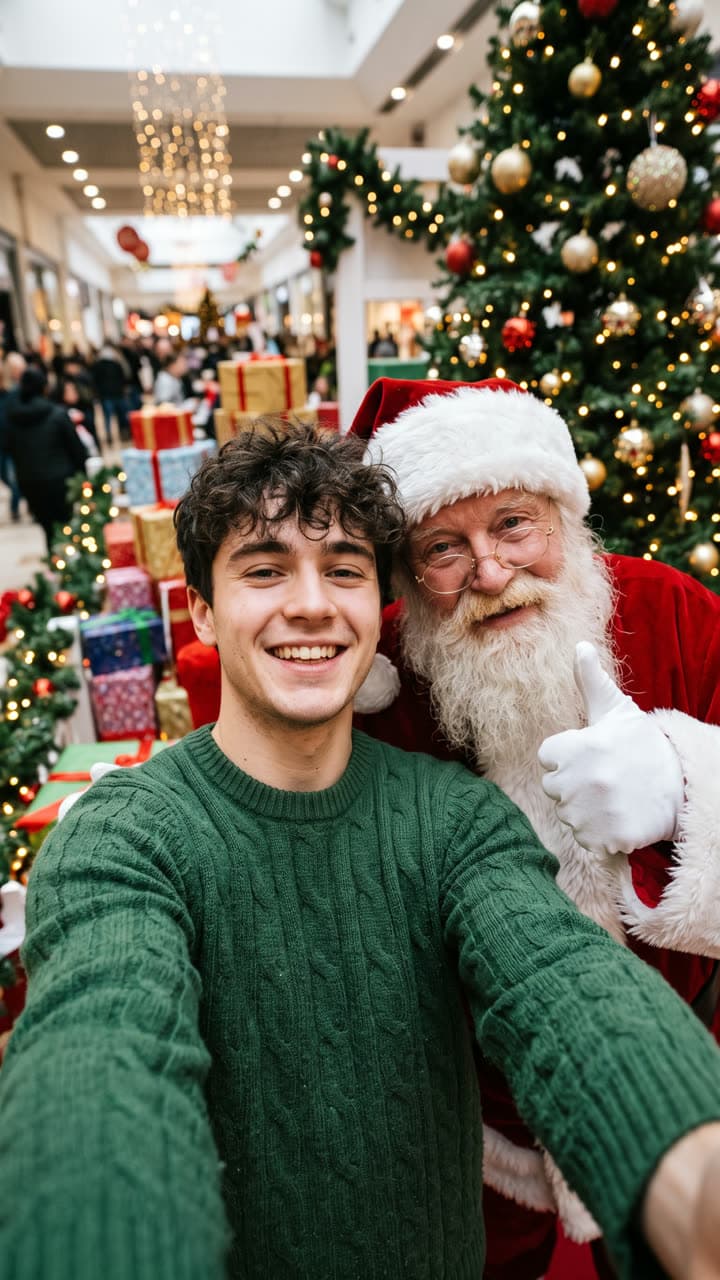
The Selfie with Santa template recreates this exact shot — a front-camera selfie at a festive mall Santa's grotto: you hold the phone at arm's length and grin while Santa Claus in a classic red suit with a full white beard leans in behind your shoulder giving a thumbs up, a decorated Christmas tree, wrapped gifts and warm string lights behind, phone wide-angle look, no logos — with you in it instead. Everything else stays as it is, then it moves like the example: santa leans in closer, laughs and gives a thumbs up while they grin into the phone; the tree lights twinkle and shoppers pass behind. Handheld selfie shot.
AI Photo to Video
Selfie with Santa1 Pick a look · optional
We put you into this example — everything else stays as it is — then it moves like the example, at no extra cost.
Failed renders refund credits
What’s in the shot
A front-camera selfie at a festive mall Santa's grotto: you hold the phone at arm's length and grin while Santa Claus in a classic red suit with a full white beard leans in behind your shoulder giving a thumbs up, a decorated Christmas tree, wrapped gifts and warm string lights behind, phone wide-angle look, no logos.
How it moves
Santa leans in closer, laughs and gives a thumbs up while they grin into the phone; the tree lights twinkle and shoppers pass behind. Handheld selfie shot.
Tips for this look
- When to post it
- Office parties, the first weekend of December, or a family chat where nobody made it to the mall this year.
- Best photo to upload
- A selfie-style photo with your face close to the camera and one arm out of frame, so the phone angle matches.
- Try a variation
- Ask for "Santa in sunglasses and a short-sleeved shirt on a beach" for a summer Christmas down south.
- Posting it
- Send it to the family group chat first; it lands best as a 'look who I ran into' message.
How to make it
Step 1
Add your photo
Upload a clear photo of yourself. Good light and a sharp face matter more than the background.
Step 2
We put you in the shot
The example is rebuilt with you in it. Nothing else is changed unless you ask for it.
Step 3
It moves like the example
The finished still becomes a clip with the same motion. Download it or share it in one tap.
FAQ
How do I put myself in the Selfie with Santa look?
Open this template, add a clear photo of yourself and press Generate. Dromana recreates the example with you in it and then animates it the same way. No prompt needed.
How much does the Selfie with Santa template cost?
70 credits with the default settings for a 5-second clip, the step into the scene included. New accounts get free credits on signing up, no card needed.
Can I change something in the Selfie with Santa look?
Yes. Type the change in the prompt box and it is made on top of the example. Ask for "Santa in sunglasses and a short-sleeved shirt on a beach" for a summer Christmas down south. Leave it empty to get the example exactly.
Will it still look like me?
Yes — the face, skin tone and hair colour come from your photo, and everything else from the example. A clear, front-facing photo works best.
Only use photos you have the right to use. See our safety guidelines.
Guides that use this look
- A photo with Santa without the mall line: a Santa selfie and video from one photo
- The holiday defrost trend: thaw out of the ice when the season starts
- Halloween TikTok trends 2026: what's blowing up and how to make each one
- Christmas TikTok trends 2026: snow globes, tacky lights, matching PJs and more
More looks like this
 Tacky lights house
 Ugly sweater party
 Matching pajamas
 Elf workshop dance
 Holiday ice rink
 Christmas morning