Mini me steps out: AI video template
- You add
- One photo
- You get
- 9:16 clip
- Credits
- 70
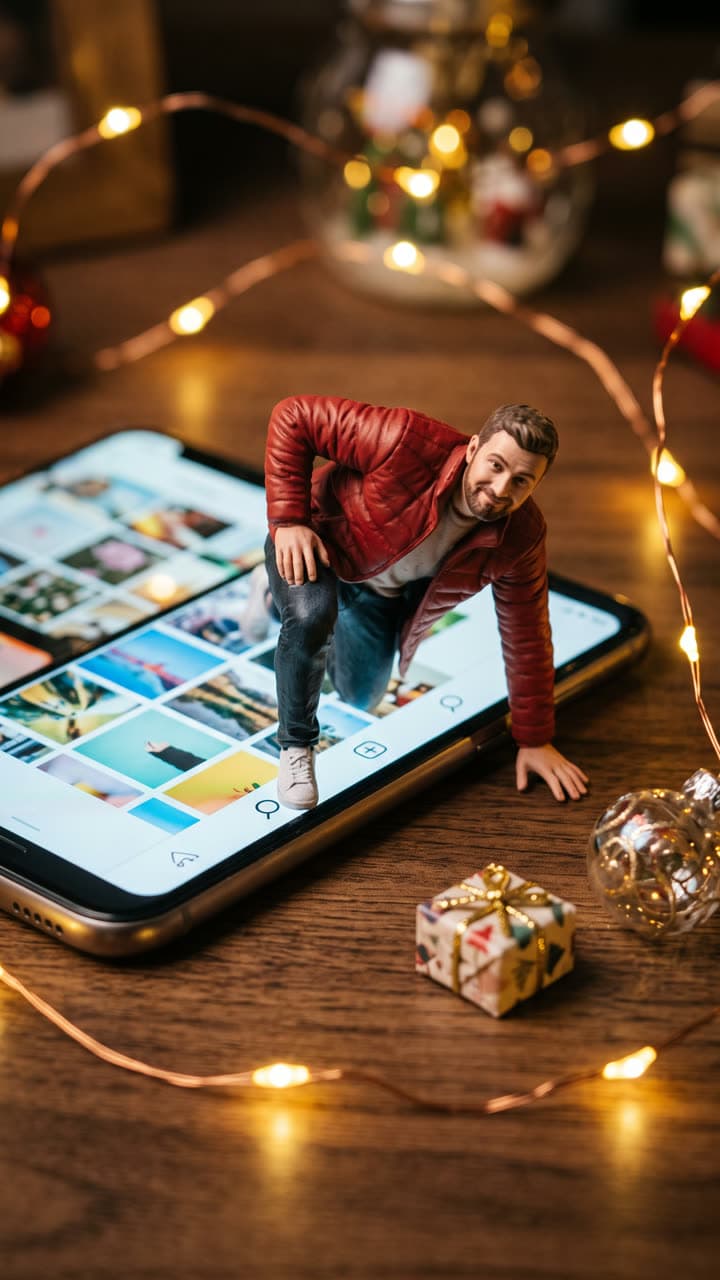
The Mini me steps out template recreates this exact shot — a detailed 1/7 scale collectible figurine of you climbing out of a smartphone lying on a wooden desk: your legs still inside the glowing screen showing a plain grid of photos, your hands pushing on the desk, warm Christmas fairy lights, a tiny wrapped gift and a glass ornament beside the phone. Painted-figure texture, shallow depth of field, product photography, no logos or app names — with you in it instead. Everything else stays as it is, then it moves like the example: the little figure pulls themself out of the glowing phone screen, steps onto the desk, brushes off their jacket and waves up at the camera while the fairy lights twinkle. Close, steady shot.
AI Photo to Video
Mini me steps out1 Pick a look · optional
We put you into this example — everything else stays as it is — then it moves like the example, at no extra cost.
Failed renders refund credits
What’s in the shot
A detailed 1/7 scale collectible figurine of you climbing out of a smartphone lying on a wooden desk: your legs still inside the glowing screen showing a plain grid of photos, your hands pushing on the desk, warm Christmas fairy lights, a tiny wrapped gift and a glass ornament beside the phone. Painted-figure texture, shallow depth of field, product photography, no logos or app names.
How it moves
The little figure pulls themself out of the glowing phone screen, steps onto the desk, brushes off their jacket and waves up at the camera while the fairy lights twinkle. Close, steady shot.
Tips for this look
- When to post it
- The run-up to Christmas, a new-profile announcement or any week the figurine trend fills your feed.
- Best photo to upload
- A full-body photo in the outfit you want on the figure; at collectible size your clothes read more than the background.
- Try a variation
- Ask for "the figure in a tiny Santa hat, holding a candy cane" to turn it into a Christmas card.
- Posting it
- Pin it to the top of your profile: the phone in the clip shows a grid, so it reads as you stepping off your own page.
How to make it
Step 1
Add your photo
Upload a clear photo of yourself. Good light and a sharp face matter more than the background.
Step 2
We put you in the shot
The example is rebuilt with you in it. Nothing else is changed unless you ask for it.
Step 3
It moves like the example
The finished still becomes a clip with the same motion. Download it or share it in one tap.
FAQ
How do I put myself in the Mini me steps out look?
Open this template, add a clear photo of yourself and press Generate. Dromana recreates the example with you in it and then animates it the same way. No prompt needed.
How much does the Mini me steps out template cost?
70 credits with the default settings for a 5-second clip, the step into the scene included. New accounts get free credits on signing up, no card needed.
Can I change something in the Mini me steps out look?
Yes. Type the change in the prompt box and it is made on top of the example. Ask for "the figure in a tiny Santa hat, holding a candy cane" to turn it into a Christmas card. Leave it empty to get the example exactly.
Will it still look like me?
Yes — the face, skin tone and hair colour come from your photo, and everything else from the example. A clear, front-facing photo works best.
Only use photos you have the right to use. See our safety guidelines.