Best AI graduation video apps: cap toss clips, announcements and senior videos
By Sebastian Ward, Reviews and comparisons editor · Updated · 4 min read
the short version
For graduation, Dromana turns one selfie into a cap-toss clip on a sunny campus lawn, even if you missed the moment. Canva and Adobe Express design graduation announcements, Animoto builds a senior slideshow, Kapwing collects messages from friends, and Remini sharpens old childhood photos for a then-and-now video.
AI Photo to Video
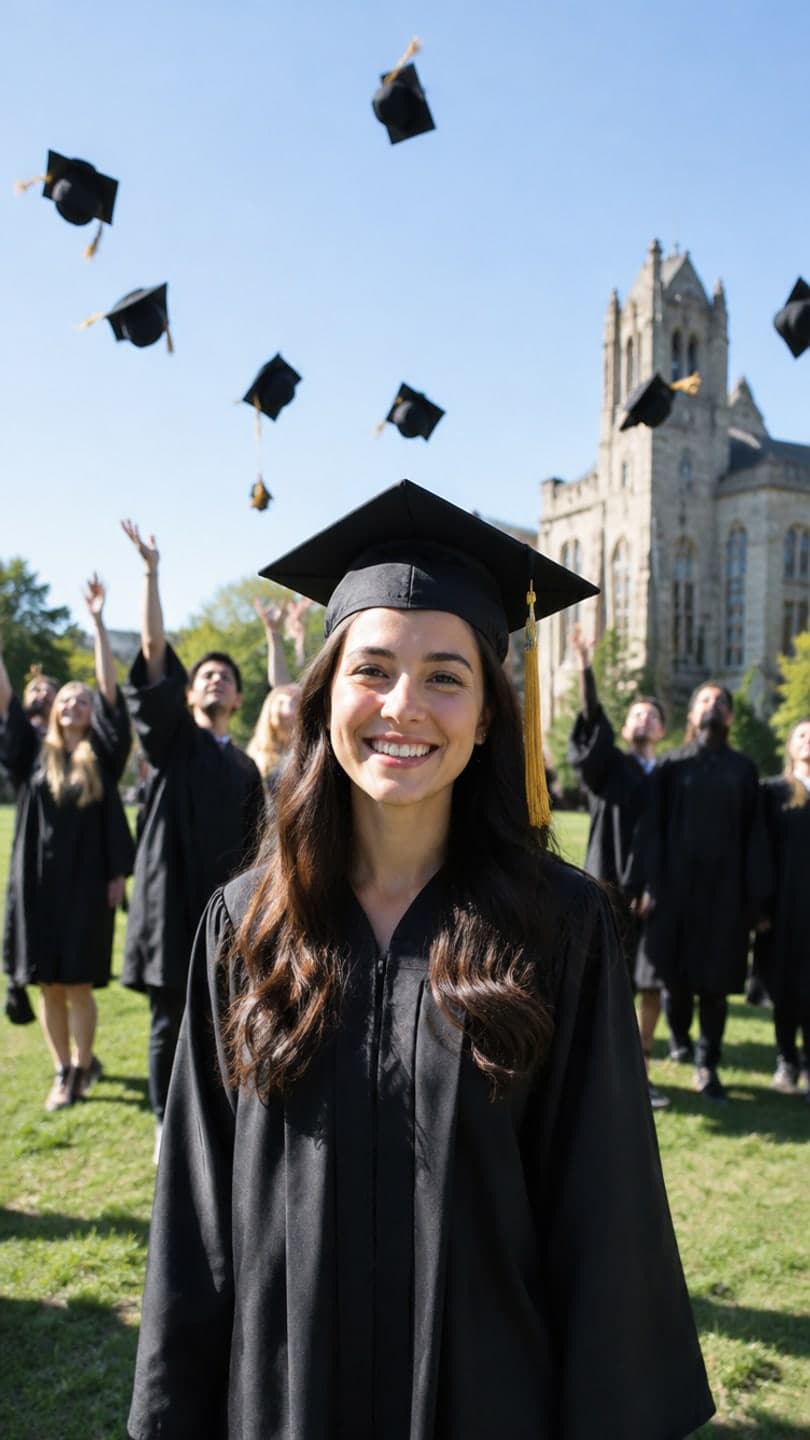 Graduation day
1 Pick a look · optional
We put you into this example — everything else stays as it is — then it moves like the example, at no extra cost.
Failed renders refund credits
What graduation videos do people make?
Graduation season runs from May to June for most schools and December for winter graduates, and it brings a burst of posts: the cap-toss clip, announcements to family, a senior video of the school years, a then-and-now with childhood photos and thank-you messages for the people who helped. AI is most useful for the moments you didn't capture and the editing you don't have time for.
Heads up: Dromana is our own product and sits in this list with the others.
Which AI graduation video apps are best?
- Dromana: a cap-toss scene on a campus lawn from one selfie, and graduation portraits.
- Canva: graduation announcements and party invitations.
- Adobe Express: polished announcement and thank-you card designs.
- Animoto: a senior slideshow with music.
- Kapwing: collecting short messages from friends into one video.
- Remini: sharpening old childhood photos for a then-and-now post.
Try this look on your own photo.
Make it with my photoWhich app makes a cap-toss clip if I missed it?
Rain, crowds or a phone that died on the day happen to everyone. Dromana's graduation day look recreates a sunny campus lawn with classmates throwing caps behind you, from one clear selfie, and ends with you throwing your own. A look video uses 70 credits; a new account starts with 70 free credits, no card. For a formal graduation portrait, describe it in AI Image for 10 credits.
Our graduation photoshoot ideas guide covers poses, props and captions for the real shoot.
How do I make a senior or then-and-now video?
Step 1
Collect photos by year
A few per school year, plus a childhood photo or two.
Step 2
Restore old prints
Sharpen faded photos first.
Step 3
Animate the first and last
A gentle motion on the oldest photo and the cap-toss clip at the end make a strong arc.
Step 4
Cut to a song
Assemble in Animoto or Instagram's editor.
Which tools work for announcements and thank-yous?
Announcements are a design job: name, school, degree and date, plus a photo. Canva and Adobe Express have graduation templates; drop in your clip or portrait. A short thank-you video to parents or teachers with one personal sentence goes a long way, and Kapwing makes it easy to add messages from siblings and friends.
What should a graduation post caption say?
The caption is where the post becomes yours. The best graduation captions are short, mention the people who helped and say what's next. They're also the first thing family members screenshot and forward, so keep spelling and names right.
- Thank one or two people by name: a parent, a teacher, a roommate.
- State the degree or school plainly for relatives who want to know.
- Add one line about what's next: a job, a city, a gap year.
- Keep jokes light; graduation posts are read by grandparents.
Post the cap-toss clip first and photos with family second; the motion stops the scroll, and the family photos get the comments. If you're making a senior slideshow for a school event, ask the organizers about length and music rules first, since many schools set limits.
How do I plan graduation videos around the ceremony?
Graduation week is chaotic, so plan the content before it starts. Take your clean full-body and portrait photos a few days early, in good light, when campus is quiet; those are the ones to use for AI clips. On the day, capture real moments with family and friends without worrying about framing. Afterwards, combine the two: the AI cap-toss or portrait clip as the opening, real photos from the day after it, and a thank-you at the end.
Which graduation video app should I choose?
- A cap-toss clip or portrait from a selfie: Dromana.
- Announcements and invites: Canva or Adobe Express.
- A senior slideshow: Animoto.
- Group messages: Kapwing.
- Restoring childhood photos: Remini.
For LinkedIn after graduation, see the best AI headshot generators.
Questions people ask
What is the best AI app for graduation videos?
Dromana for a cap-toss clip or portrait from a selfie; Canva for announcements; Animoto for a senior slideshow.
Can AI make a cap toss video if I missed it?
Yes. Dromana's graduation day look recreates a cap toss on a campus lawn with you in it from one selfie.
How do I make a senior video?
Collect photos from each school year, restore old ones, animate the first and last, and cut them to a song.
How do I make a graduation announcement?
Use a Canva or Adobe Express template with your name, school, degree and date, plus a photo or clip.
Is there a free graduation video app?
A free start is possible on most apps; Dromana's 70 sign-up credits cover one cap-toss clip.
When is graduation season?
Mostly May and June, with winter graduations in December.
Effects from this guide
 Make a photo moveUpload one photo, get a 5-second video in a minute or two: a smile, a head turn, wind in the trees, waves rolling in. Works on portraits and landscapes, free to try.
 AI fashion portraitSkip the photographer: get a magazine-style fashion portrait from one selfie. Quiet-luxury coats, street editorial, studio light. Same face, new shoot. Free to try.
Keep reading
 Graduation photoshoot ideas: poses, props and senior picture inspiration4 min read
 Best AI headshot generators in 2026: one selfie vs. training packs5 min read
 Best apps to animate old photos with AI in 20264 min read
 Halloween TikTok trends 2026: what's blowing up and how to make each one9 min read
 Best AI influencer generators in 2026: virtual influencers, AI creators and you in every trend5 min read
Ready to make yours?
Add one photo and get the look from this guide.