Best AI fashion video apps: outfit clips, catwalks and fit checks
By Sebastian Ward, Reviews and comparisons editor · Updated · 4 min read
the short version
AI fashion video apps turn an outfit photo into a moving clip: a catwalk walk, a fit check in an elevator mirror, a fitting room reveal or a lookbook scene. Dromana recreates fashion trend shots with your face and outfit from one photo. Higgsfield has fashion presets, Runway gives control for brand work, Canva builds lookbooks and Picsart handles quick edits.
AI Photo to Video
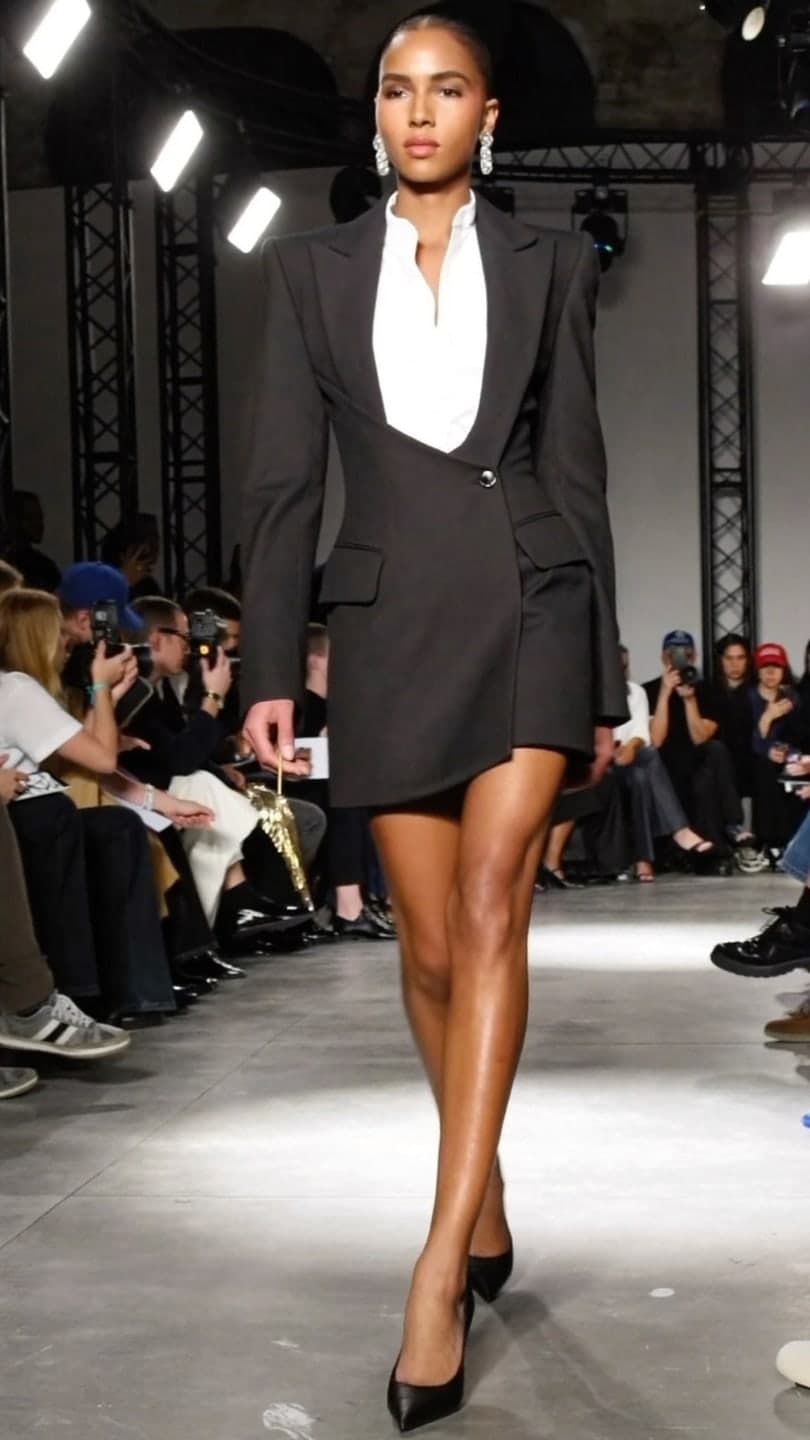 Catwalk strut
1 Pick a look · optional
We put you into this example — everything else stays as it is — then it moves like the example, at no extra cost.
Failed renders refund credits
What is an AI fashion video?
Fashion content moves fast: fit checks, get-ready-with-me clips, haul reveals and mini lookbooks are posted daily on TikTok and Instagram. An AI fashion video takes a photo of an outfit, on you or on a model, and turns it into motion: a walk toward the camera, a turn in a mirror, fabric moving in the wind or a reveal in a new location. For small brands it means product videos without a studio day; for creators it means more posts from the outfits you've already shot.
Full disclosure: Dromana is our product and appears in this comparison. We've described each tool by what it's best at.
Which AI fashion video apps are best?
- Dromana: fashion trend shots, like catwalks, fit checks and fitting room reveals, that keep your face and outfit.
- Higgsfield: a big preset library with fashion and camera-move styles.
- Runway: precise control and editing for brand campaigns and lookbooks.
- Luma Dream Machine: natural fabric movement and cinematic camera work.
- Canva: lookbooks, carousels and sale posts with your brand fonts.
- Picsart: quick cutouts, background swaps and stickers on outfit photos.
Try this look on your own photo.
Make it with my photoWhich fashion trends can I recreate from one photo?
Dromana's fashion looks are built around the formats people search for and keep the cut, color and pattern of what you're wearing:
- Catwalk strut: a confident walk down a fashion-show catwalk under flashes.
- Elevator fit check: the mirror-selfie fit check, made to move.
- Fitting room: a curtain-pull outfit reveal.
- Laundromat fit: a street-style shot among the machines.
- Monochrome tailoring and quiet luxury: polished, editorial looks.
- Thrift haul: a secondhand-find reveal.
For a single outfit shown in several clips, our fit check video guide shows how to cut them together.
Can small clothing brands use AI fashion videos?
Yes, with care. Results made on a paid plan or with a credit pack you bought can be used commercially, in product pages, ads and social posts. The rule that matters most is accuracy: the clip must show the garment as it really is. Check the color, print, length and fit in every clip, and don't use a clip that makes the product look different from what customers will receive.
- Use a sharp photo with the whole garment visible.
- Shoot on a model or mannequin rather than flat, for walking and turning looks.
- Keep one or two real photos in every listing next to AI clips.
- Label AI content where platforms ask; see labeling AI content.
For garments without a person, product looks like tee on hanger work from a simple product photo. More on this in best AI product video tools.
How do I get clean fashion results?
Step 1
Show the whole outfit
Head to shoes for full looks; cropped photos make the AI invent the rest.
Step 2
Avoid busy mirrors and clutter
They confuse where you end and the background begins.
Step 3
Pick a look that suits the garment
Flowing fabric suits walks and wind; tailoring suits still, editorial poses.
Step 4
Check the details
Logos, prints and small text can blur; keep close-ups as stills.
What do fashion clips cost to make?
On Dromana, a fashion look video uses 70 credits and a still image uses 10. New accounts get 70 free credits with no card, plus 35 more each day you visit. For regular posting, the Starter plan is $10 a month for 900 credits, and credit packs start at $8 for 500 credits with no subscription. Other tools mostly use credit plans too; our AI video pricing guide explains how to compare them.
Which fashion video app should I choose?
- Trend-format fashion clips with your face and outfit: Dromana.
- More fashion presets and camera moves: Higgsfield.
- Brand campaigns with full control: Runway.
- Lookbooks and sale posts: Canva.
Try it with an outfit photo in AI Video, or swap clothes in a still first with the best AI outfit changer apps.
Questions people ask
What is the best AI fashion video app?
Dromana for trend-format fashion clips that keep your face and outfit; Higgsfield for presets; Runway for brand campaigns.
Can AI make a catwalk video from a photo?
Yes. The catwalk strut look turns a full-length outfit photo into a walk with show lighting.
Will AI keep my outfit's color and print?
Fashion looks are built to keep cut, color and pattern, but always check fine prints and logos.
Can I use AI fashion videos for my clothing brand?
Yes, from a paid plan or a bought credit pack, as long as the clip shows the product accurately.
How much does an AI fashion video cost?
Each fashion look clip uses 70 credits on Dromana, and a still uses 10; no subscription is required.
What photo works best for fashion videos?
A sharp, full-length photo with the whole outfit visible and a simple background.
Effects from this guide

Keep reading
 Best AI outfit changer apps: try on clothes and new looks from one photo4 min read
 How to make a fit check video from just photos4 min read
 Best AI product video tools for small sellers in 20264 min read
 The angel wings AI trend: walk the fashion show catwalk from one photo4 min read
 Halloween AI photo trends 2026: the late-night call, ghost besties, video store horror and more5 min read
Ready to make yours?
Add one photo and get the look from this guide.