Best AI birthday video apps: surprise clips, party invites and birthday posts
By Sebastian Ward, Reviews and comparisons editor · Updated · 4 min read
the short version
For birthdays, Dromana turns one photo of the birthday person into a fun clip, like a disco night, a paparazzi entrance or a concert front row. Hedra makes a portrait sing happy birthday, JibJab does funny e-cards, Canva makes party invites, and Animoto builds a memories slideshow. Ask before using someone else's photo for a public post.
AI Photo to Video
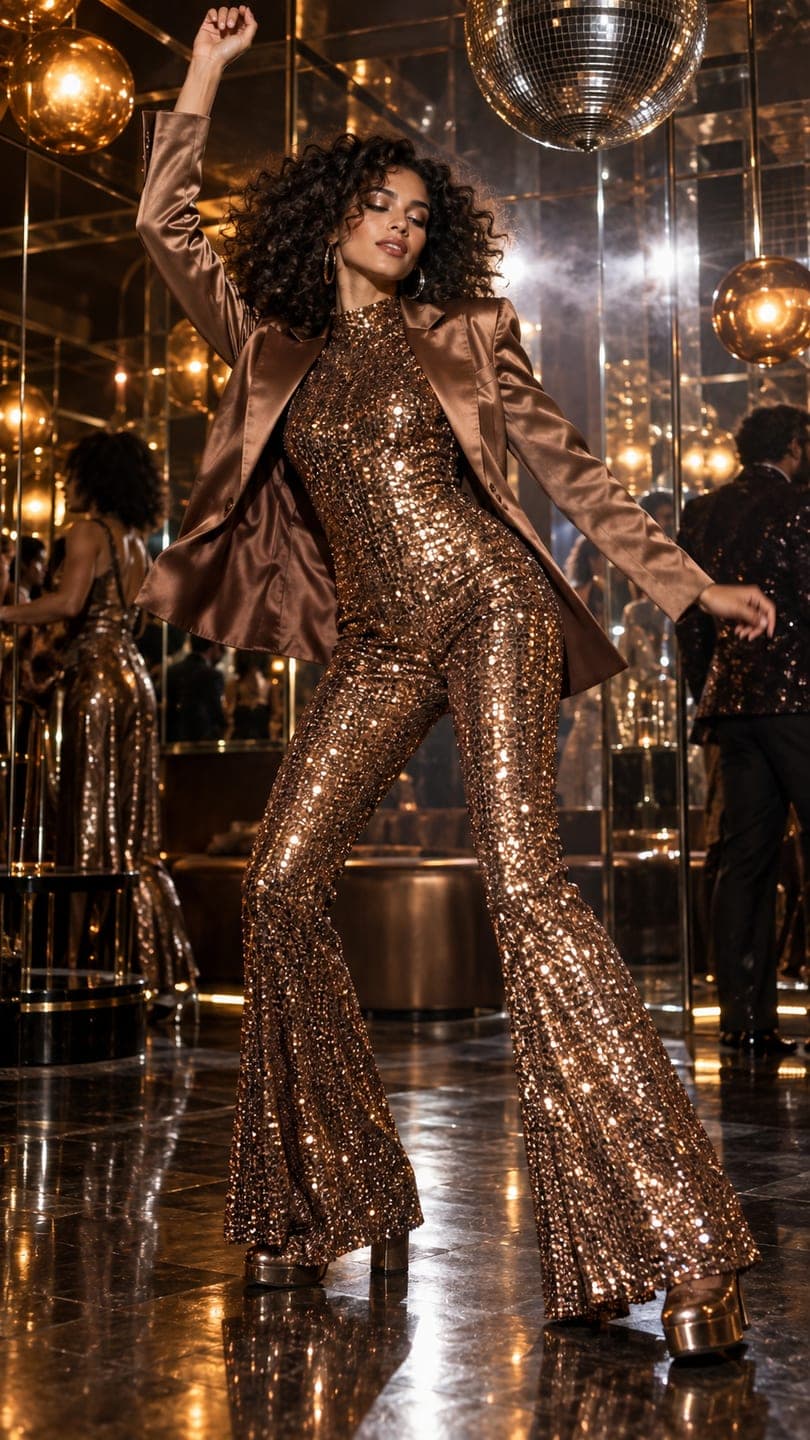 Disco revival
1 Pick a look · optional
We put you into this example — everything else stays as it is — then it moves like the example, at no extra cost.
Failed renders refund credits
What birthday videos can I make with AI?
Birthdays are year-round, which makes them one of the most useful reasons to have an AI video tool. The common pieces are a surprise clip for a friend's story, your own birthday post, a party invitation, a singing message from a group and a memories slideshow of the person over the years.
Dromana is our own product; we've included it alongside apps we don't make.
Which AI birthday video apps are best?
- Dromana: one photo of the birthday person becomes a fun scene, like a disco night, a red-carpet arrival or a concert front row.
- Hedra: a portrait that sings or speaks your birthday message.
- JibJab: funny animated birthday e-cards with friends' faces.
- Canva: party invitations, story templates and birthday graphics.
- Animoto: a memories slideshow with music.
- Kapwing: cutting group video messages together.
Try this look on your own photo.
Make it with my photoWhich app makes the best surprise clip for a friend?
A surprise clip works when it's flattering and a little over the top. Dromana's looks put the birthday person in a scene they'll want to repost: the disco revival, the paparazzi flash, the front-row concert or the catwalk strut. Upload one clear photo of them, generate, and send it on the morning of their birthday. A look video uses 70 credits; a new account starts with 70 free credits, no card.
How do I make my own birthday post?
For your own birthday, mix one or two clips with stills: a glam clip as the first slide, then real photos from the day. Our birthday photoshoot ideas guide has setups, cake shots and captions, and AI Image can restyle a selfie into a birthday portrait for 10 credits.
Can a short clip work as a party invite?
Step 1
Make a five-second clip
A fun scene of the birthday person, like the house party look.
Step 2
Add the details
Date, time, place and dress code in a Canva template.
Step 3
Send it
Group chat or a story with a link to RSVP.
How do I make a group birthday surprise?
The most memorable birthday videos come from a group. One person collects short messages from friends and family, another makes a fun opening clip of the birthday person, and the result is stitched together and sent at midnight or first thing in the morning. It takes a few days to collect messages, so start a week ahead.
- Ask everyone for a 10-second clip, filmed vertically, saying one specific memory.
- Open with a fun AI clip of the birthday person to set the tone.
- Cut the messages together in Kapwing or Instagram's editor.
- End with a group photo or a clip of everyone shouting happy birthday.
- Send it privately first; post publicly only if the birthday person wants to.
For milestone birthdays, add a few childhood photos brought to life in AI Video between the messages.
What makes a birthday clip feel personal?
The difference between a clip that gets a polite like and one that gets reposted is a personal detail. Pick a scene that connects to something the person loves: the concert look for the friend who never misses a show, the catwalk for the one who lives in their outfits, the disco look for the one who always ends up on the dance floor. Add their nickname or an inside joke as text, and send it at a time that shows you remembered, like just after midnight.
Which birthday video app should I choose?
- A fun clip from one photo: Dromana.
- A singing birthday message: Hedra.
- A funny e-card: JibJab.
- Invitations and graphics: Canva.
- A memories slideshow: Animoto.
- Group video messages: Kapwing.
For moving old photos of the birthday person into a slideshow, see the apps to animate old photos.
Questions people ask
What is the best AI birthday video app?
Dromana for a fun clip from one photo; Hedra for a singing message; JibJab for e-cards; Canva for invites.
Can I make a birthday video from one photo?
Yes. Upload a clear photo of the birthday person to a look like disco revival or paparazzi flash.
How do I make a birthday invitation video?
Make a short fun clip, add the date, place and dress code in a template, and send it to the group.
Is it OK to use a friend's photo?
For a private message, usually; for a public post, ask first and use a photo they like.
Is there a free AI birthday video app?
Yes for a first try: Dromana's 70 sign-up credits pay for one birthday look video, no card needed.
What should a birthday caption say?
Short and personal works best; our birthday photoshoot guide has caption ideas.
Effects from this guide
 Night out photo filterTurn an ordinary selfie into a night-out shot: hard flash, neon wash, dark background, sweat-and-glitter energy. Same face, new night. 70 free credits to start.
 Make a photo moveUpload one photo, get a 5-second video in a minute or two: a smile, a head turn, wind in the trees, waves rolling in. Works on portraits and landscapes, free to try.
Keep reading
 Birthday photoshoot ideas you can do at home4 min read
 Best friend photoshoot ideas: 30 poses and themes for two (or three)4 min read
 Best apps to animate old photos with AI in 20264 min read
 Best AI Mother's Day and Father's Day video apps: tributes, cards and memories4 min read
 Halloween TikTok trends 2026: what's blowing up and how to make each one9 min read
Ready to make yours?
Add one photo and get the look from this guide.