Late-night call: AI video template
- You add
- One photo
- You get
- 9:16 clip
- Credits
- 70
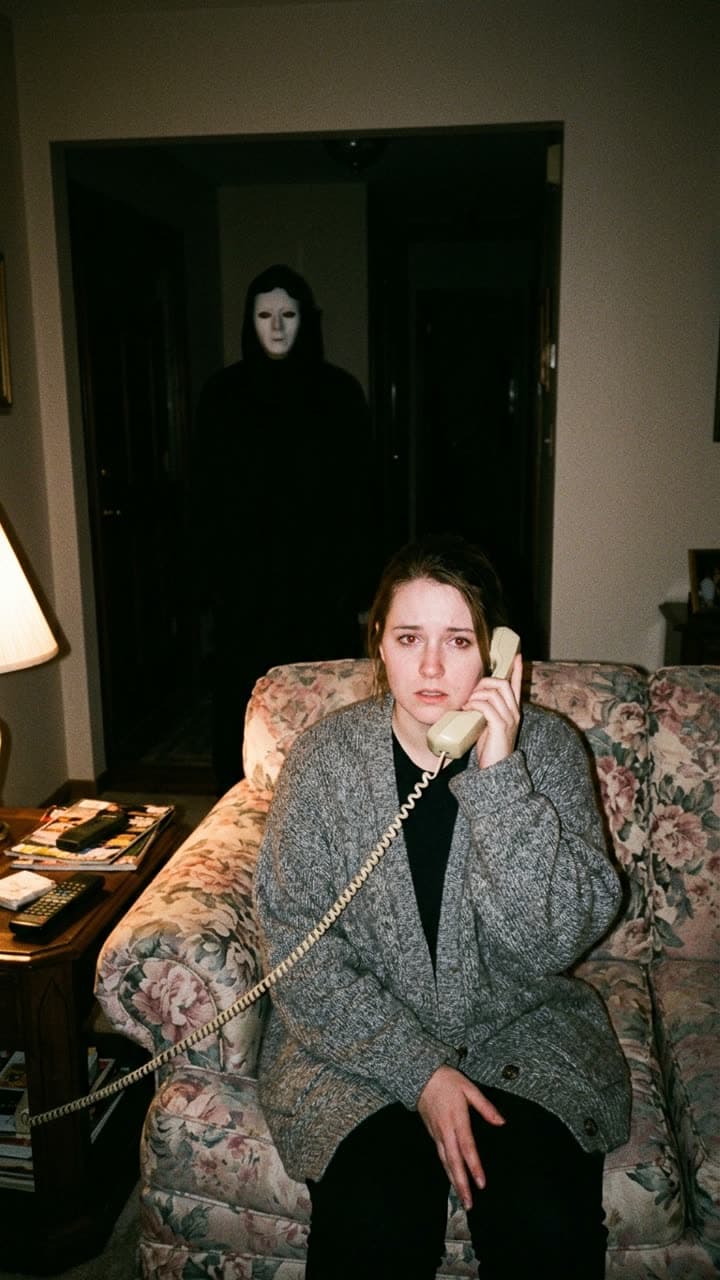
The Late-night call template recreates this exact shot — a grainy late-1990s disposable-camera flash photo: you sit on a floral couch in a dim living room at night holding a beige corded landline phone to your ear with a worried look, while behind you in the dark hallway doorway stands a tall figure in a black hooded robe and a plain pale featureless mask. Harsh flash, film grain — with you in it instead. Everything else stays as it is, then it moves like the example: they press the phone closer and their eyes slowly slide toward the camera while, behind them, the hooded figure in the pale mask tilts its head and takes one slow step out of the doorway; the lamp flickers. Handheld, grainy.
AI Photo to Video
Late-night call1 Pick a look · optional
We put you into this example — everything else stays as it is — then it moves like the example, at no extra cost.
Failed renders refund credits
What’s in the shot
A grainy late-1990s disposable-camera flash photo: you sit on a floral couch in a dim living room at night holding a beige corded landline phone to your ear with a worried look, while behind you in the dark hallway doorway stands a tall figure in a black hooded robe and a plain pale featureless mask. Harsh flash, film grain.
How it moves
They press the phone closer and their eyes slowly slide toward the camera while, behind them, the hooded figure in the pale mask tilts its head and takes one slow step out of the doorway; the lamp flickers. Handheld, grainy.
Tips for this look
- When to post it
- The last two weeks of October, when the 90s phone-call horror trend peaks.
- Best photo to upload
- A seated or waist-up photo with a neutral expression; the worry works better than a scream.
- Try a variation
- Ask for "the masked figure is right behind the couch" for a closer scare.
- Posting it
- Open on the still for half a second, then let the figure move; use a ringing-phone sound.
How to make it
Step 1
Add your photo
Upload a clear photo of yourself. Good light and a sharp face matter more than the background.
Step 2
We put you in the shot
The example is rebuilt with you in it. Nothing else is changed unless you ask for it.
Step 3
It moves like the example
The finished still becomes a clip with the same motion. Download it or share it in one tap.
FAQ
How do I put myself in the Late-night call look?
Open this template, add a clear photo of yourself and press Generate. Dromana recreates the example with you in it and then animates it the same way. No prompt needed.
How much does the Late-night call template cost?
70 credits with the default settings for a 5-second clip, the step into the scene included. New accounts get free credits on signing up, no card needed.
Can I change something in the Late-night call look?
Yes. Type the change in the prompt box and it is made on top of the example. Ask for "the masked figure is right behind the couch" for a closer scare. Leave it empty to get the example exactly.
Will it still look like me?
Yes — the face, skin tone and hair colour come from your photo, and everything else from the example. A clear, front-facing photo works best.
Only use photos you have the right to use. See our safety guidelines.