Best AI Lunar New Year video apps: greetings, family portraits and red envelopes
By Sebastian Ward, Reviews and comparisons editor · Updated · 4 min read
the short version
For Lunar New Year, Dromana restyles a selfie or family photo into a festive red-and-gold portrait and can turn it into a short greeting clip. Canva and Adobe Express make greeting cards with your message in any language, Hedra can turn a portrait into a spoken greeting, Animoto builds a family slideshow, and shops can use product looks for festive promotions.
AI Photo to Video
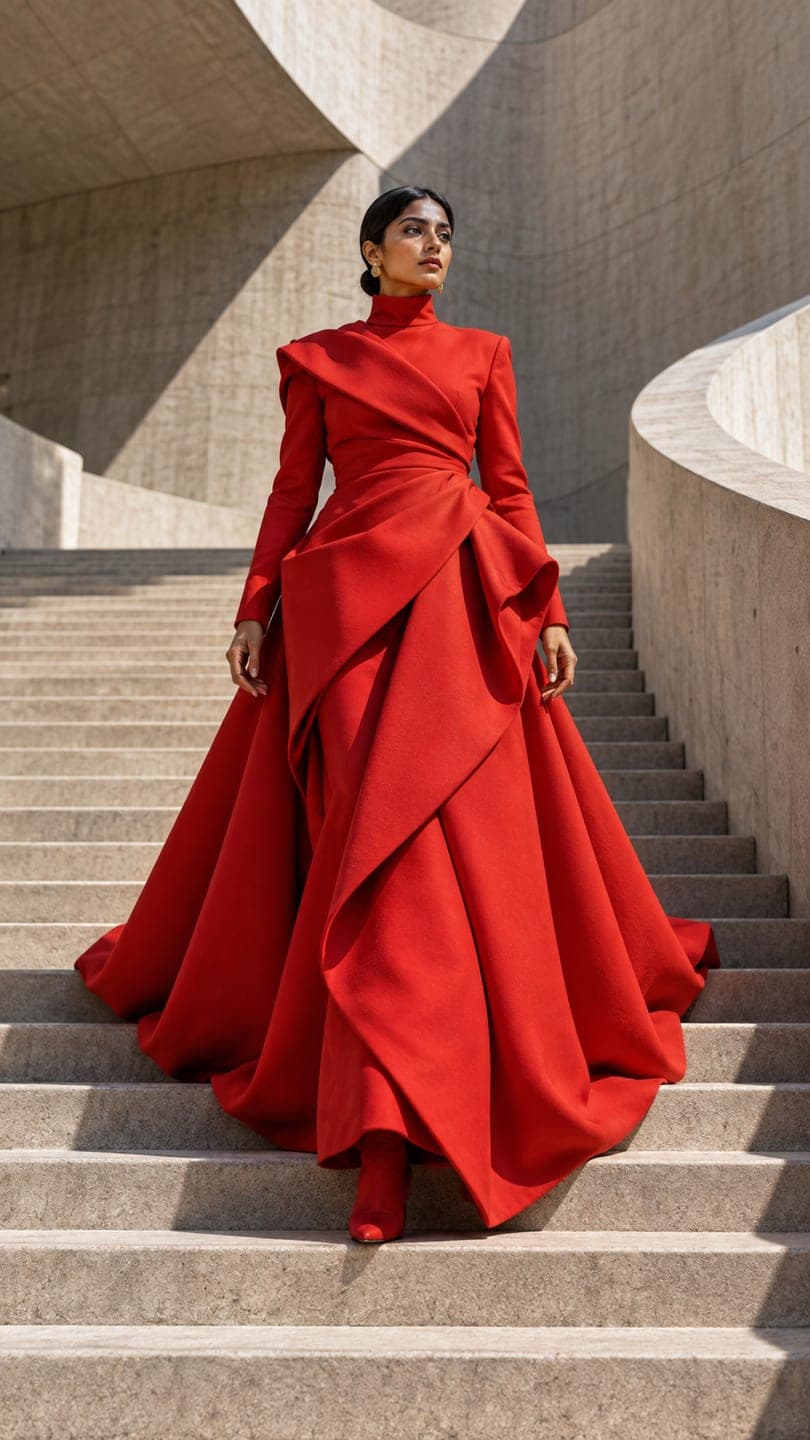 Scarlet couture
1 Pick a look · optional
We put you into this example — everything else stays as it is — then it moves like the example, at no extra cost.
Failed renders refund credits
What do people make for Lunar New Year?
Lunar New Year is one of the biggest greeting seasons of the year, with messages sent to family, friends and customers in the days around the new moon. The most common pieces are festive portraits in red and gold, short greeting videos, family photo slideshows and shop promotions. Because greetings often go to grandparents and relatives, they need to look warm and respectful more than trendy.
To be clear from the start, Dromana is our own product and it's included here.
Which AI Lunar New Year apps are best?
- Dromana: festive portraits and short greeting clips from a selfie or family photo.
- Canva: greeting card templates with text in English, Chinese, Vietnamese, Korean and more.
- Adobe Express: elegant card and poster designs with traditional motifs.
- Hedra: a portrait that speaks your recorded greeting.
- Animoto: a family slideshow set to music.
- Remini: sharpens old family photos before you use them.
Try this look on your own photo.
Make it with my photoHow do I make a festive portrait from a selfie?
Upload a clear selfie or family photo to AI Image and describe the scene: "festive Lunar New Year portrait, red silk outfit with gold embroidery, lanterns and plum blossoms behind, warm light, same face". Each image uses 10 credits, and a new account starts with 70 free, no card. The scarlet couture look and the AI fashion portrait are good red-themed starting points.
How do I make a greeting video?
Step 1
Make the portrait
Create a festive still of you or your family.
Step 2
Make it move
Animate it gently in AI Video: "smiles and bows slightly, lanterns sway, slow push-in".
Step 3
Add the greeting
Put your message on the clip in Canva or Adobe Express, in the language your family uses.
Step 4
Send it
Share it in family chats the evening before or on the first day.
Which tools work for shop promotions?
Restaurants, bakeries and gift shops run promotions before the holiday. Product looks keep your product's shape, label and color, so a gift box or a pastry box can sit in a festive scene. Try the bakery box or gift unboxing looks and describe red and gold decorations in the prompt. See the best AI video tools for small business for the rest.
What details make a Lunar New Year portrait feel right?
Small, specific details make a festive portrait look considered rather than generic. Red and gold are the core colors, but the best images add one or two touches that relatives recognize: paper lanterns, plum or peach blossoms, a red envelope in hand, a bowl of tangerines on the table, or the year's zodiac animal in a decoration. Traditional outfits, such as a qipao, hanbok or áo dài, suit portraits for family greetings; a red sweater and a lantern-lit street suit a casual post.
- Name the tradition you celebrate so the setting fits, whether Chinese, Vietnamese, Korean or another.
- Ask for warm evening light; lanterns look best at dusk.
- Keep backgrounds simple so the greeting text has room.
- For family photos, make sure every face is clear and well lit.
If the greeting goes to grandparents, a calm, smiling portrait with a gentle motion is usually more welcome than a flashy effect.
Which Lunar New Year app should I choose?
- Festive portraits and greeting clips: Dromana.
- Greeting cards in your language: Canva or Adobe Express.
- A spoken greeting from a portrait: Hedra.
- A family slideshow: Animoto.
- Restoring older family photos: Remini.
Questions people ask
What is the best AI app for Lunar New Year greetings?
Dromana for festive portraits and short greeting clips; Canva or Adobe Express for cards with your message in any language.
Can AI make a festive red-and-gold portrait from my selfie?
Yes. Upload a clear selfie and describe the outfit, setting and light, keeping "same face" in the prompt.
How do I make a Lunar New Year greeting video?
Make a festive portrait, animate it gently, add your greeting text and share it in family chats.
Can I use family photos?
Yes, with permission, especially from older relatives. Keep the style warm and respectful.
Is there a free app for Lunar New Year videos?
Free tiers exist on most apps. On Dromana, the 70 sign-up credits cover several festive portraits at 10 credits each.
When should I send Lunar New Year greetings?
The evening before or on the first day of the new year is traditional.
Effects from this guide
 AI fashion portraitSkip the photographer: get a magazine-style fashion portrait from one selfie. Quiet-luxury coats, street editorial, studio light. Same face, new shoot. Free to try.
 Make a photo moveUpload one photo, get a 5-second video in a minute or two: a smile, a head turn, wind in the trees, waves rolling in. Works on portraits and landscapes, free to try.
Keep reading
 Christmas card photo ideas for families, couples, friends and pets4 min read
 Best apps to animate old photos with AI in 20264 min read
 Best AI video tools for small business marketing in 20264 min read
 Diwali photo ideas: festive portraits, family pictures and AI looks for 20264 min read
 Halloween TikTok trends 2026: what's blowing up and how to make each one9 min read
Ready to make yours?
Add one photo and get the look from this guide.